James
James
Trying to keep up with Twitter's relentless feed by posting manually can feel like you're constantly playing catch-up. When you learn how to schedule a Twitter post, you shift from just reacting to the timeline to building a real strategy. It's a simple change, but it's the key to making sure your best content lands in front of your audience at the right time, even if you’re nowhere near your keyboard.
Why You Should Schedule Your Twitter Posts

Back in the early days, we all posted to Twitter on the fly because that was the only way. But the platform has evolved. A tweet's lifespan is ridiculously short now, so if you’re just posting whenever you have a spare moment, your content is likely to get buried before anyone sees it. Scheduling turns what feels like a chore into a powerful advantage.
Let's look at the core differences between posting on the fly and using a strategic, scheduled approach.
Manual vs Scheduled Posting: A Quick Comparison
| Aspect | Manual Posting | Scheduled Posting |
|---|---|---|
| Consistency | Sporadic and inconsistent; depends on your daily availability. | Consistent presence; maintains an active feed 24/7. |
| Timing | Limited to when you are online; often misses peak hours. | Strategic; targets optimal engagement times across time zones. |
| Content Quality | Prone to rushed typos and less thoughtful content. | Higher quality; allows for batching, proofreading, and planning. |
| Workflow | Reactive; constant pressure to think of what to post next. | Proactive; frees up time for real-time community engagement. |
| Stress Level | High; can feel like a constant, draining content treadmill. | Low; work is done in focused blocks, reducing daily pressure. |
As you can see, scheduling isn't just about convenience; it fundamentally changes how you manage your presence and the results you can expect.
Maintain a Consistent Brand Voice
Building a brand people remember on a noisy platform like Twitter requires one thing above all else: consistency. When you schedule your content, you guarantee your account stays active and reliable, even when you're swamped with other work or on vacation. A steady drumbeat of valuable content teaches your audience what to expect from you, which is how you build trust.
This isn't just about posting a lot. It’s about creating a dependable rhythm. An account that shares three insightful tweets every single day is infinitely more valuable than one that dumps ten tweets in an hour and then goes silent for a week.
Boost Engagement and Visibility
The Twitter algorithm is known to favor accounts that are consistently active and spark conversations. Scheduling lets you strategically hit those peak engagement hours when your audience is most active and ready to interact. It’s a simple tactic that can give your reach, likes, and retweets a serious bump.
Think about what this unlocks:
- Targeting Time Zones: Got a global audience? You can schedule posts to go live while your followers in London are on their morning commute, without you having to wake up at 3 a.m.
- Event Participation: You can pre-load your tweets for a live event, a Twitter chat, or a product launch. This ensures you’re part of the conversation, even if you get pulled into a meeting at the last minute.
Scheduling isn't just a time-saver; it's a growth strategy. By planning your content, you give every post the best possible chance to be seen, engaged with, and amplified by your audience.
Improve Your Content Quality and Workflow
Let’s be honest—rushing to post something in the moment is a recipe for typos, half-baked ideas, or missed opportunities. Scheduling forces a more deliberate approach. You can set aside a block of time to create your content for the week, which gives you the space to edit, fact-check, and find the perfect image or GIF.
This workflow doesn't just elevate the quality of your individual tweets; it also frees up a ton of mental energy. Instead of constantly stressing about what to post next, you can spend your live Twitter time on what really matters: genuine engagement. That means replying to comments, jumping into relevant discussions, and actually building relationships.
With a tweet having a half-life of just 43 minutes, scheduling has become essential for staying visible. If you want to dive deeper, you can find more insights on Twitter posting frequency at TweetArchivist.com.
Using Twitter's Built-In Scheduling Tool

Sometimes, the simplest tool is the right one for the job. Twitter's own scheduler is a perfect example—it's built right into the platform, so there's nothing new to sign up for or learn. It's my personal go-to for one-off, important posts that absolutely have to go out at a specific time.
Think about a major product announcement set for 9 AM EST while you know you'll be stuck in your morning commute. The night before, you can draft the perfect tweet, attach your visuals, and schedule it right there on Twitter. No stress, no last-minute scrambling. It just works.
How to Schedule a Post on Desktop
Getting a post scheduled is incredibly simple. From the Twitter (now X) homepage, you'll start the process exactly like you're posting in real-time.
- First, click the blue "Post" button to open the composer. Write your message, add your images or a poll—get it exactly how you want it.
- Next, look at the row of icons at the bottom of the composer. You're looking for a small calendar icon with a clock face. That’s the scheduler.
- Clicking it opens a new window where you can pick the precise date and time for your tweet to be published.
- Once you’ve set the time, just click "Confirm," then finish by hitting the blue "Schedule" button.
And that's it. Your tweet is now sitting in the queue, ready to go live automatically at the time you chose.
The biggest selling point for the native tool is its sheer simplicity. It’s a clean, no-frills way to schedule a Twitter post for those critical moments, guaranteeing your key messages land right on time.
Limitations You Should Know
While the built-in scheduler is fantastic for individual posts, you'll start to feel its limitations pretty quickly if you're trying to build a more robust content plan. It's just not designed for volume or complexity.
Here’s where it falls short:
- No Bulk Scheduling: You have to schedule every single tweet one by one. If you're planning a week's worth of content, this becomes a tedious, time-consuming task.
- Limited Mobile Functionality: The full scheduling feature is really only available on desktop. As of now, you can't schedule posts directly from the mobile app.
- Basic Analytics: It doesn't offer any real insights or recommendations. You won't get data on your best-performing times, so you're left to figure that out on your own.
The native tool is an excellent starting point, but knowing when you've outgrown it is crucial for scaling your strategy. To dig deeper, check out our guide that offers a full breakdown and answers the question of whether you can schedule Tweets on Twitter with more advanced tools.
Leveling Up with Advanced Scheduling Tools like Buffer
Twitter's built-in scheduler is fantastic for getting a few time-sensitive posts out the door. But once you start thinking bigger—managing different content themes or planning weeks ahead—you’ll quickly hit its limits. That’s where a dedicated social media management platform like Buffer really shines. It helps you move from just posting tweets to building an actual system.
Getting set up is simple. You just connect your Twitter profile to Buffer, and in a couple of clicks, you’ve got a powerful dashboard at your fingertips. This isn't just for Twitter, either; it becomes the command center for your entire social media presence, all in one place.
Building Your First Posting Schedule
The real game-changer with Buffer is its queue and scheduling system. Instead of manually picking a date and time for every single tweet, you create a blueprint of ideal posting times.
Let's say you know your audience is most engaged around 8:15 AM, 12:30 PM, and 5:00 PM on weekdays. You set up those time slots just once in your Buffer schedule. After that, every new post you add to your "queue" automatically slides into the next open spot. It’s a beautifully simple way to guarantee consistency.
Buffer brilliantly separates the act of creating content from the task of scheduling it. This means you can sit down for an hour, write a dozen tweets, drop them all into your queue, and walk away confident they’ll go out at the perfect times.
Think about it from a small business owner's perspective. Your weekly plan might involve:
- Monday: A tweet promoting this week's special offer.
- Tuesday: Sharing a link to your new blog post.
- Wednesday: Posing a question to get your community talking.
- Thursday: A behind-the-scenes photo of the team.
- Friday: Highlighting a glowing customer review.
With a tool like Buffer, you could knock all of that out first thing Monday, add it to the queue, and you're done. No more daily scramble trying to figure out what to post.
Visualizing Your Content Strategy
One of the best things about Buffer is the visual content calendar. It lays out all your upcoming posts in a clear, easy-to-read format, giving you a bird's-eye view of your strategy.
This makes it incredibly easy to spot problems. For example, you might see you accidentally scheduled three promotional posts back-to-back. The calendar view lets you just drag and drop one to another day, ensuring your content mix stays balanced and engaging.
For a much deeper look into getting the most out of the platform, we put together a complete step-by-step guide to using Buffer for your social media. This is the kind of strategic control you need when you're ready to schedule a Twitter post like a seasoned pro.
Put Your Best Content on Autopilot with Evergreen Tools
Let's be real—the real magic happens when your best content starts working for you around the clock. I'm talking about your cornerstone blog posts, your most helpful tips, and those case studies that always get a great response. This is your evergreen content, the stuff that stays relevant no matter what. You could manually reshare it, but who has time for that? Letting it collect dust in your archives is an even bigger mistake.
This is exactly why pairing a dedicated evergreen tool like EvergreenFeed with a scheduler like Buffer is such a game-changer. You’re not just scheduling one-off posts anymore. You’re building a powerful, self-sustaining library of your top-tier content that gets automatically recycled for weeks or even months.
It’s a simple but brilliant workflow: connect your tools, fill up your content libraries, and then let the system handle the day-to-day posting.
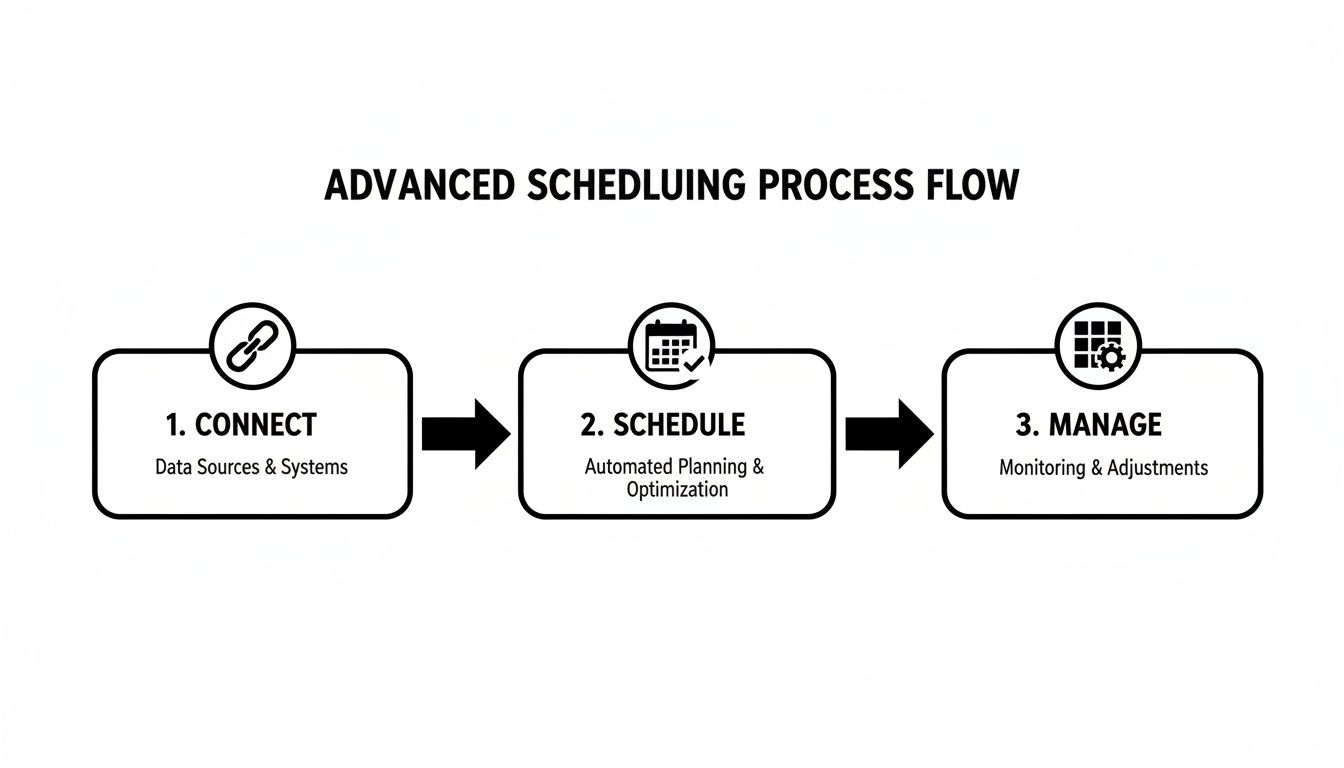
As you can see, once you’ve done the initial setup, the repetitive, tedious work of scheduling and managing is completely off your plate.
First, Organize Your Content Into Buckets
Before you can automate anything, you need to get organized. The best way to do this is by sorting your content into "buckets" or categories. Think of them like different radio stations for your Twitter feed. This simple act of organization is what prevents your feed from becoming repetitive and keeps your audience engaged.
For example, a typical content creator's buckets might look something like this:
- Blog Posts & Guides: Links to your in-depth, cornerstone articles.
- Quick Tips & Tricks: Bite-sized, actionable advice your followers can use immediately.
- Industry News & Curation: Your take on relevant third-party articles and news.
- Promotional Content: Gentle nudges toward your newsletter, products, or services.
After setting up your buckets in a tool like EvergreenFeed, you just drop each piece of content into the right category. Got a new blog post? It goes into the "Blog Posts" bucket. A great industry statistic? Pop it into "Quick Tips & Tricks." Easy.
This isn't just about tidy organization; it's a strategic foundation. By categorizing your posts, you get granular control over what you share and when. You can tell the system, "Share something from my blog posts every Monday, but only share a promotional tweet once a week."
Next, Create Your Automated Resharing Schedule
With your buckets loaded up with great content, it's time to build a schedule that practically runs itself. This is where the integration with Buffer really shines. You can create specific rules for each bucket, telling the system exactly how often to pull a post from it and which one of your Buffer queues to send it to.
For instance, your weekly schedule could be set up to:
- Pull one tweet from the "Blog Posts & Guides" bucket every Monday and Wednesday at 9 AM.
- Select two tweets from "Quick Tips & Tricks" to go out on Tuesdays and Thursdays at 1 PM.
- Share one tweet from the "Promotional Content" bucket every Friday morning at 11 AM.
The tool then automatically picks a random post from the correct bucket at the right time and adds it to your Buffer queue. This means you can add a new article to its bucket once and the system will reshare it for you for months to come. The time you get back is huge—time you can spend creating new content instead of just managing the old.
And if you’re looking for new ways to keep those buckets full, you might want to see how you can create authentic AI generated social media posts that engage. It’s a great way to generate fresh material that feels right at home alongside your handcrafted content.
Building a Data-Driven Twitter Posting Schedule
Just plugging your tweets into a scheduler is easy. The real magic happens when you build a smart schedule that gets your content in front of the right people at the right time. It’s about ditching the guesswork and using real data to figure out when your audience is actually listening.
So, where do you start? A good baseline comes from looking at the big picture. Timing is everything on a fast-moving platform like X, and broad studies of millions of tweets give us a solid starting point.
Generally, the sweet spot for engagement is midweek. Think Tuesdays through Thursdays, when people are settled into their work routines. The best times tend to be from late morning to mid-afternoon—roughly 10 AM to 5 PM. This makes sense, as it captures people scrolling during their commute, on their lunch break, or during that classic afternoon slump.
Finding Your Audience's Rhythm
Those industry-wide stats are great, but your audience is unique. The most valuable insights won't come from a study; they'll come from your own Twitter Analytics. It's free, it's built-in, and it's a goldmine.
Head over to your analytics dashboard and spend some time in the "Audience" tab. This will show you when your followers are most active. Then, pop over to the "Tweets" tab to see which posts got the most impressions and engagement. You're looking for patterns.
Look for the outliers. Did a random 9 PM post get a huge response? Maybe your audience is full of night owls. The goal is to evolve from following generic advice to creating a posting schedule that’s perfectly synced with your followers' habits.
Stop Winging It: Use Content Buckets
If your feed is just one long sales pitch, you're going to see your follower count drop. Fast. To keep people engaged and coming back for more, you need variety. I’ve found the best way to manage this is by using "content buckets."
This simple system ensures I’m always posting a healthy mix of content. Here’s a framework I often recommend:
- Educate & Inform (40%): This is your bread and butter. Share helpful tips, quick tutorials, industry news, and links to your best articles. Give people value.
- Engage & Interact (30%): This is all about conversation. Ask questions, create polls, reply to comments, and share content from others in your community.
- Promote & Sell (20%): Here's where you share links to your products, services, or special offers. It's crucial for business, but it shouldn't be the only thing you talk about.
- Curate & Share (10%): Share interesting articles from other sources (with your own commentary) or give a little behind-the-scenes look at your brand.
Thinking about how these buckets fit into a larger strategy is key. For a more complete picture, consider how this aligns with a broader B2B social media marketing playbook.
Start by scheduling your posts during those generally accepted "best times." But don't set it and forget it. Make it a habit to check your analytics every week and tweak your schedule based on what you see. For a deeper look at this, our guide on finding the best time to tweet has even more detail. A little bit of testing and paying attention to your data will make all the difference.
Common Questions About Scheduling Twitter Posts
Even with the best tools in your arsenal, a few questions always pop up when you get into a regular scheduling rhythm. Let's tackle some of the most common ones I hear from people so you can smooth out your workflow.
Can You Schedule a Twitter Thread?
Yes, you absolutely can, and it's a game-changer for storytelling. While you can't do this with Twitter's built-in scheduler, dedicated tools like Buffer or Hootsuite make it incredibly easy.
You just write your first tweet, then look for a little "+" button or an "Add Tweet" option. This lets you build out your entire thread, piece by piece, before you schedule the whole thing to go live at once. This is perfect for breaking down bigger ideas or telling a longer story without having to babysit your phone to post each tweet manually.
What Happens if I Edit a Scheduled Tweet?
Think of your scheduled tweets as drafts sitting in a queue. When you edit one, you're just updating the draft. The new version replaces the old one, but it keeps its spot in line and will still post at the time you originally set.
Here's the bottom line: Editing a scheduled post won't make it go live immediately. It just saves your changes, so you have the freedom to tweak and perfect your content right up until it's published.
So, if you schedule a tweet for Friday morning and then spot a typo on Thursday night, no problem. Just pop in, fix it, and it will still go out on Friday as planned.
Why Did My Scheduled Tweet Fail to Post?
It’s always a bit frustrating when a post doesn't go live, but there's usually a simple explanation. Nine times out of ten, it’s one of these issues.
Here's what to check first:
- Your account connection dropped. This is the number one culprit. If you change your Twitter password, your scheduling tool (like Buffer or EvergreenFeed) loses its permission to post for you. It's an easy fix, but it happens all the time.
- Twitter flagged it as duplicate content. Twitter is very sensitive about spam and doesn't like seeing the exact same tweet posted over and over. If your tool tries to publish something identical to a recent post, the platform might block it.
- There was a temporary API hiccup. Sometimes, the connection between your scheduling app and Twitter just has a momentary blip. These issues usually resolve themselves pretty quickly.
Your first move should always be to reconnect your Twitter account inside your scheduling tool's settings. This single step solves the vast majority of posting errors. If that doesn't work, take a look at the content itself—a quick rephrase is often all you need to get past the duplicate content filter.
Ready to stop worrying about manual resharing and put your best content on a true autopilot schedule? EvergreenFeed integrates seamlessly with Buffer to create a powerful, automated system for your evergreen content. Sign up for free and start automating today!