James
James
If you're tired of the endless cycle of creating, editing, and posting TikToks in real-time, scheduling is about to become your best friend. It’s a simple concept: you upload your finished videos, either through TikTok itself or another tool, and tell them exactly when to go live. This one change can take your content plan from chaotic to strategic, freeing you up to actually focus on creating great stuff.
Why Scheduling TikToks Is Your Secret Growth Lever
Trying to manually post on TikTok at the "perfect" time every day is a surefire path to burnout. Before we get into the nuts and bolts of how to schedule, let's talk about why it's such a game-changer. This is about so much more than just saving a few minutes; it’s about shifting your entire content strategy from reactive to proactive.
When you aren't scrambling to post something right now, you suddenly have the mental space to think about quality. This is where the magic really happens. You can sit down for one dedicated session, batch-create a week's worth of videos, and ensure everything feels cohesive and on-brand.
Consistency Feeds the Algorithm
Let's be real: the TikTok algorithm loves consistency. When you post regularly, especially at times when your audience is most active, you're sending strong signals to the platform that you're a serious creator. This reliability can be a huge factor in getting your videos pushed to more For You Pages (FYP).
Scheduling makes this consistency effortless. You can hit peak engagement hours for your audience in a different time zone while you're fast asleep. Your content engine just keeps chugging along, building momentum and growing your account, no matter what you're doing.
The real power of scheduling isn't just saving time—it's gaining control. You stop letting the platform dictate your day and start building a sustainable system that works for you, unlocking consistent growth without the constant pressure.
The Benefits of a Proactive Strategy
Moving to a scheduled workflow gives you some serious advantages that you just can't get with manual posting. You stop chasing trends last-minute and start thinking like a true content strategist.
Here’s what you gain:
- Prevent Burnout: Batching your content creation and scheduling it out frees you from that daily "what do I post?" pressure. Your creative energy is a finite resource—protect it.
- Maintain Quality: Let's face it, rushed posts often look… rushed. Scheduling gives you time to review, tweak captions, and perfect everything before it goes live.
- Global Reach: Have a growing audience in another country? No problem. You can easily schedule posts for their prime time without messing up your own sleep schedule.
- Strategic Planning: Laying out your posts on a calendar lets you see the bigger picture. You can spot gaps, plan content pillars, and ensure you have a healthy mix of educational, entertaining, and behind-the-scenes content.
Once you get comfortable with this approach, you can even take it a step further. If you're curious about how far you can push this, you can learn more about automated social media posting and see how deep the rabbit hole of efficiency goes.
Mastering TikTok's Native Scheduling Tool
If you're just starting to think about planning your content ahead of time, TikTok's own scheduler is the best place to start. It’s built right into the platform, it's free, and honestly, it couldn't be simpler. It's the perfect tool for when you need to schedule a one-off announcement or just plan your feed for the next few days.
One crucial detail, though: you can only access the scheduler through the desktop browser version of TikTok, not the mobile app. So, the first thing you'll need to do is hop on a computer and log into your account.
Finding and Using the Scheduler
Once you're logged in at TikTok.com, look for the Upload button in the top-right corner. Clicking that will take you to the main upload page where you can get your video ready to go. You can either drag and drop your video file or browse your computer to select it.
After your video is uploaded, you’ll see all the familiar options. This is your chance to write a killer caption, load it up with relevant hashtags, and tag any other accounts you're collaborating with. You can even pick the perfect cover image from a frame in your video, which is a great way to keep your profile grid looking sharp.
The final, most important part is flipping the Schedule video toggle. As soon as you turn that on, a calendar and time selector will pop up, letting you pinpoint the exact date and time you want your TikTok to go live.
Understanding the Key Limitations
TikTok's native tool is great for its simplicity, but you'll start to feel its limitations as your content strategy gets more sophisticated. Knowing what it can't do will help you figure out when it's time to look into a more robust third-party tool.
Here's what you'll run into:
- A 10-Day Scheduling Window: You can only schedule posts up to 10 days out. This is a real roadblock for anyone trying to plan a full month of content in advance.
- No Bulk Scheduling: Every single video has to be uploaded and scheduled one by one. If you've just batch-created a week's worth of content, this process can feel pretty repetitive and time-consuming.
- Desktop-Only Access: For creators who do everything from their phones, being tied to a computer to schedule posts can be a major inconvenience.
Despite these constraints, getting comfortable with the native scheduler is an excellent first step. It helps you build the habit of planning ahead without throwing a bunch of complicated features at you.
At the end of the day, this tool is perfect for specific situations. Got a big launch happening next Tuesday? A collaboration video you want to drop first thing Friday morning? For these kinds of isolated, important posts, the native scheduler is a reliable and easy choice. It gets the job done for simple, short-term planning.
Leveling Up Your Workflow with Buffer
When you're ready to get serious about your TikTok strategy and move beyond basic, short-term planning, a dedicated social media management tool like Buffer can be a total game-changer. The most obvious win is breaking free from TikTok's native 10-day scheduling window, but the real power comes from managing your entire social media presence from a single, unified dashboard.
This shift lets you see the bigger picture. You can manage your TikTok content right alongside your posts for Instagram, Facebook, and other channels, giving you a holistic view of your content calendar. For a deep dive into getting everything set up, our guide on using Buffer for all your social media needs is a great place to start.
Connecting Your Account and Scheduling
Getting your TikTok account hooked up to Buffer is a breeze. Once you've signed up for Buffer, you just need to connect your TikTok profile by authorizing it—it's a quick, guided process.
From there, you’ll find Buffer’s interface is built for efficiency. You can upload your finished video, write out your caption, and drop in your hashtags, all in one place. But here's where it gets much better than the native scheduler: you can plan your content weeks or even months out. This long-range planning is invaluable for mapping out content around big campaigns, holidays, or product launches.
This is what your queue can look like inside Buffer—a clean, visual overview of all your upcoming posts.
The calendar view is especially helpful. It lets you spot content gaps at a glance and ensures you’re keeping up a consistent posting rhythm without feeling like you're constantly scrambling to post manually.
Advanced Features and Strategic Timing
Buffer's real magic lies in its features designed for creators and marketers who need more than just basic scheduling. One of my favorite features is the ability to schedule a post but receive a mobile notification right before it’s set to go live.
Why is this so useful? It’s the perfect workaround for adding trending audio. You get to prep everything ahead of time—the video, the caption, the hashtags—and then when the notification pops on your phone, you can quickly add a viral sound in the TikTok app just before you hit publish. It’s a hybrid approach that gives you both the organization of scheduling and the agility to stay relevant.
This method truly offers the best of both worlds. You maintain a consistent, pre-planned content calendar while still having the flexibility to jump on viral moments as they unfold.
Buffer also helps you dial in your posting times. Data consistently shows that timing is critical for getting those initial views. Evenings, for example, tend to be a sweet spot for engagement. Some studies suggest posting Tuesdays through Thursdays from 5 p.m. to 9 p.m. EST is a great window to catch people after work.
Overcoming Limitations and Expanding Your Strategy
While Buffer solves a lot of the problems with TikTok's native scheduler, think of it as a powerful hub in a larger ecosystem of tools. You can use it to manage your core content calendar and then bring in other specialized tools to handle different parts of your social media machine.
For instance, once you have your scheduling down, you can explore things like TikTok e-commerce platform integration to connect your product promotions directly to your scheduled posts. This is how you transition from simply putting out content to building an efficient, interconnected, and ultimately more profitable social media strategy.
Taking It a Step Further: Automating Your Best Content with EvergreenFeed
Once you get the hang of scheduling one-off posts, you'll start wondering how to get even more of your time back. That's when you move from simple scheduling to true automation. Think of it as building a content machine that runs itself, freeing you up to focus on creating new great stuff.
Your best videos—those killer tutorials or perfect brand showcases—deserve more than a single day in the spotlight. By pairing a tool like EvergreenFeed with Buffer, you can build a system that automatically recycles your top-performing content. It’s a genuine "set-it-and-forget-it" setup for the videos that bring you the most value.
This isn’t just about saving time; it’s about making your content work smarter. Your profile stays consistently active, your best work gets seen by new waves of followers, and you keep the momentum going without lifting a finger. For busy creators or small businesses, this is a total game-changer.
Think in "Content Buckets"
The secret to making this work without spamming your audience is organization. The whole strategy hinges on sorting your content into themed categories, or what I call "content buckets." Instead of just dumping all your videos into one long, random queue, you group them by purpose.
This gives you total control over the rhythm and flow of what your audience sees. For instance, you could set up buckets for your main content pillars:
- Pro Tips: All your best how-to guides and tutorials.
- Behind the Scenes: The content that shows the human side of your brand.
- Client Wins: Powerful social proof that builds trust and shows you get results.
- Quick Hits: Fun, shareable quotes or memes that resonate with your community.
From there, you can give each bucket its own schedule. Maybe you post a "Pro Tip" every Monday morning and a "Client Win" every Friday afternoon. This creates a content mix that feels intentional and varied, not just random. If you want to dive deeper into this workflow, you can learn more about how to automate your social media posts. It keeps your feed balanced and prevents things from getting repetitive.
Why Constant Activity Maximizes Your Reach
So, why go to all this trouble? Because on TikTok, consistency is everything. The more often you share valuable content, the more you signal to the algorithm that your account is a go-to source. Sustaining that level of activity is key for growth, but trying to do it all manually is a recipe for burnout.
For anyone managing multiple accounts, the big question is always about ROI. Does posting more actually move the needle? The data is pretty clear. When creators went from posting just once a week to 2-5 posts, they saw a 17% increase in views per post. Bumping that up to 6-10 posts a week can lead to 29% more views. And for the super-prolific, posting 11 or more times can boost views per post by a massive 34%. You can dig into the data on how posting frequency impacts your TikTok account to see the full picture.
This isn't about just throwing more content out there and hoping something sticks. It’s a strategy for systematically republishing your proven winners, ensuring they continue to find new audiences and keep your account growing 24/7.
A video that you poured hours into creating can now drive engagement for months on end, all on autopilot. You're maximizing the return on your creative energy and scaling your presence without actually scaling your workload.
Essential Strategies For Scheduled Content
Knowing how to schedule a TikTok post is just the first domino. A smart strategy is what really topples the rest and turns simple consistency into genuine growth. Once you've got your scheduling workflow locked in, it's time to zero in on the details that get your content seen.
Your best guide here is your own data. Seriously, get familiar with your TikTok Analytics. Head over to the "Followers" tab, and you'll find a goldmine of information showing you exactly when your audience is scrolling. Don't fall for generic "best times to post" articles—your audience has its own unique rhythm, and your schedule should dance to that beat.
Crafting Content That Connects
After you've pinpointed your golden posting hours, the spotlight shifts to the content itself. A brilliant video can easily get lost in the noise if it isn't packaged correctly. Before you hit "schedule," pay close attention to these three things.
- Compelling Captions: Your caption is your first handshake. Ask a question to spark conversation, hint at a surprise to build intrigue, or drop a bold opinion. Anything to get those comments rolling.
- Strategic Hashtags: Think of hashtags as signposts for the algorithm. Use a mix of broad tags, super-niche ones, and anything currently trending. A solid combo of 3-5 relevant tags helps TikTok figure out who needs to see your video.
- Scroll-Stopping Thumbnails: Your video's cover is its billboard, especially for anyone browsing your profile. Pick a frame that’s bright, clear, and makes people curious enough to tap.
Think of each scheduled post as a complete package. The video is the gift, but the caption, hashtags, and thumbnail are the wrapping paper and bow that make someone want to open it. Don't rush them.
Finding Your Posting Rhythm
Everyone preaches consistency on TikTok, but what does that really look like in practice? You need a posting cadence that tells the algorithm you’re a serious creator, but not one that burns you out and tanks your video quality.
While there’s no magic number, TikTok itself has gone on record recommending you post 1-4 times per day. This gives you more shots at hitting the For You Page and lets you catch different audience segments as they log on. If you're posting multiple times, try spacing them out by a few hours to keep your content fresh in the feed.
The data backs this up. More posts often lead to more views.
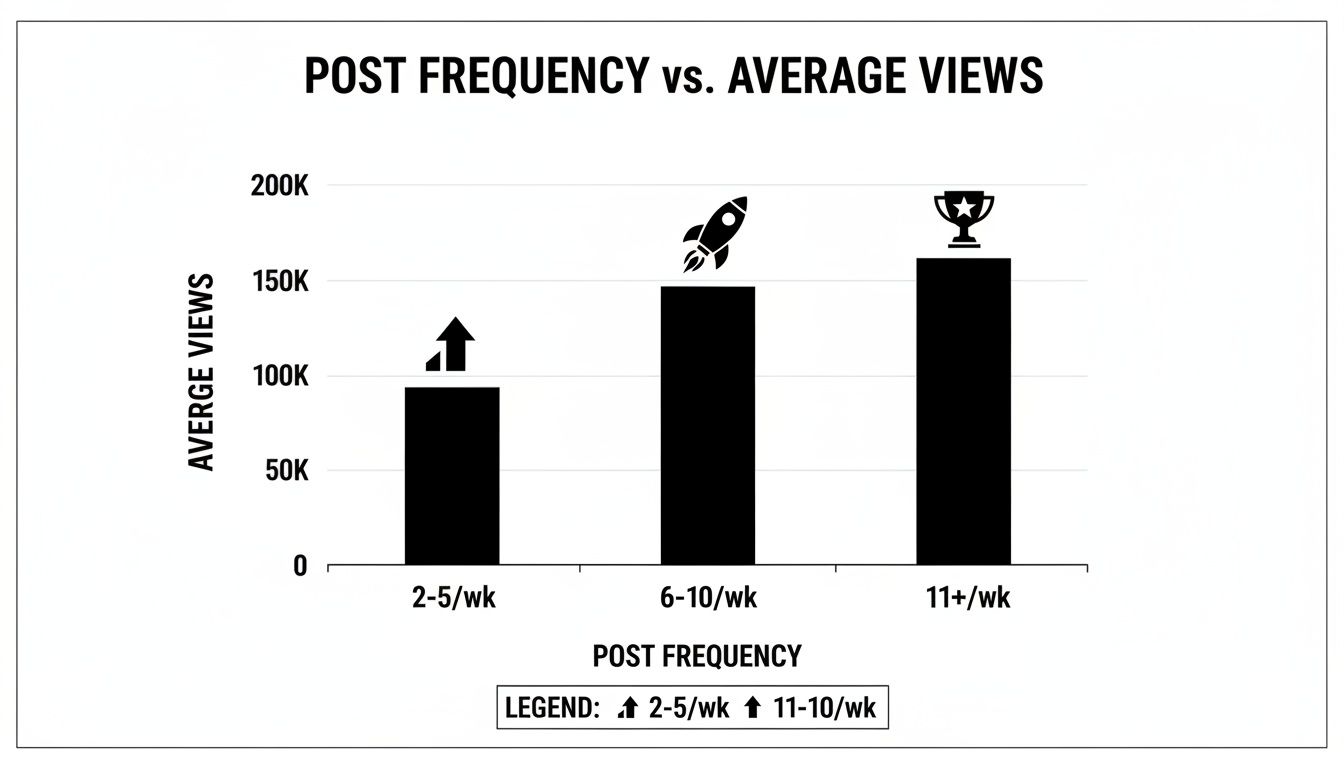
This relationship between frequency and viewership is pretty clear. To put some numbers on it, an analysis using a fixed-effects regression model shows just how much each additional post can help.
Impact of Posting Frequency on TikTok Views
| Posts Per Week | Average Increase in Views Per Post |
|---|---|
| 1-3 | +5% |
| 4-6 | +12% |
| 7-10 | +20% |
| 11+ | +38% |
As you can see, the accounts posting 11 or more times per week see the most significant jump in average views.
This is exactly where scheduling becomes a non-negotiable tool. It’s what makes a high-volume posting schedule manageable without living on your phone. Beyond just scheduling, looking into various AI tools for ecommerce can also open up new ways to automate other parts of your content strategy. At the end of the day, a winning approach is always a blend of smart timing, great content, and a relentless rhythm.
A Few Common Questions About Scheduling TikToks
Whenever you're trying a new workflow, a few questions are bound to pop up. When it comes to scheduling TikToks, I've noticed creators and marketers tend to run into the same hurdles. Let's tackle them head-on so you can start scheduling your content with confidence.
Will Scheduling Hurt My Reach?
This is probably the number one question I hear, and it's a valid concern. The good news is the short answer is no, as long as you use the right tools.
Schedulers like Buffer are official TikTok partners, meaning they use the official API to publish your videos. From TikTok's perspective, a post published via an approved API is no different than one you upload yourself directly in the app. There's zero penalty.
What the algorithm really cares about is the quality of your content and how your audience responds to it—not the upload method.
How Do I Use Trending Audio and Effects?
Okay, this is a big one. Since you can't access TikTok's native sound library through a third-party tool, how do you jump on a trend before it's over? This requires a bit of a hybrid approach, but it works really well.
Here’s what I do:
- Prep Everything in Advance: I get my video, caption, and all the hashtags lined up in my scheduling tool.
- Set a Reminder, Not a Post: Instead of choosing auto-publish, I set the scheduler to send a mobile notification to my phone at the perfect time.
- Finalize in TikTok: When that notification dings, I just open the pre-loaded post in TikTok, add the trending sound or effect in seconds, and then hit publish.
This little workaround gives you the best of both worlds—you get the planning benefits of a content calendar while still being nimble enough to stay on top of trends.
What’s the Best Tool if I’m on a Budget?
Not ready to spring for a paid tool? No problem. If you're just starting out, TikTok’s own native scheduler (on desktop) is 100% free and a fantastic way to get into the rhythm of planning your content.
The main limitation is that you can only schedule up to 10 days out, but for most people, that's more than enough to get started.
Once you find yourself needing to plan further than 10 days ahead or start juggling multiple accounts, that's when a paid tool really becomes a smart investment. The time you save is almost always worth the small cost.
What if a Scheduled Post Fails?
It’s rare, but technology isn't perfect. A post might fail to go live, usually because of a brief hiccup with TikTok's API or if the video file itself has an issue (wrong format, too long, etc.).
Don't worry, though. Reputable schedulers will send you an email alert right away so you can figure out the problem and quickly reschedule. My best advice is to always give your video a final check against TikTok's specs for length, size, and dimensions before you hit schedule. An ounce of prevention saves a lot of headaches here.
Ready to stop posting on the fly and build a real content engine? EvergreenFeed puts your best videos on autopilot, keeping your profile active and growing around the clock. Sign up for free and start automating today!