Leiann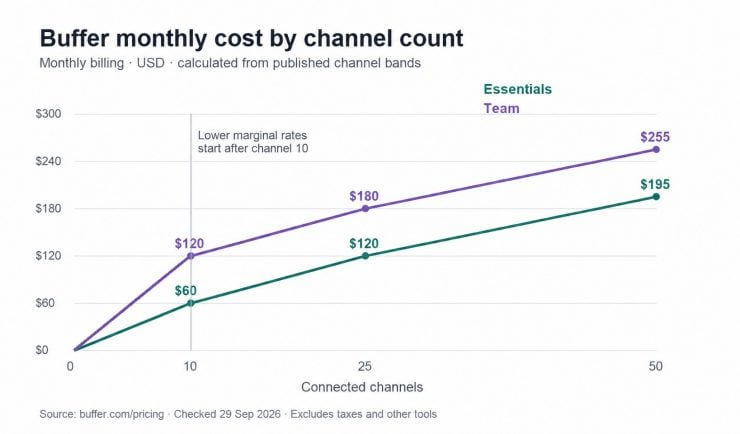
Adding one more social account should be a small decision. With Buffer, it also changes your subscription bill. A plan advertised at a few dollars a month can become a larger expense once you count every brand, profile and teammate involved.
Buffer is a social media scheduling and management tool. Its paid plans charge by connected channel, while its Free plan supports a small publishing setup. For an EvergreenFeed user, there is another practical question: how much will the whole workflow cost to keep a library of useful posts circulating through Buffer?
Here is the quick answer. Buffer is free for up to three channels. For the first ten channels, Essentials costs $6 per channel on monthly billing, or $60 per channel billed annually. Team costs $12 per channel monthly, or $120 per channel billed annually. Additional channels above ten use lower rates. The examples below show how that changes your budget.
Prices checked: Sep 29, 2026. All examples use USD and exclude taxes, promotional discounts and other tools.
What does each Buffer plan cost?
The current Buffer pricing page lists three plans. Annual prices below show both the effective monthly amount and the amount paid for a year; the effective amount is not a monthly payment option.
Plan |
Monthly billing, per channel |
Annual billing, per channel |
Included users |
|---|---|---|---|
Free |
$0, up to 3 channels |
$0 |
1 |
Essentials, channels 1–10 |
$6 |
$60/year, equivalent to $5/month |
1 |
Team, channels 1–10 |
$12 |
$120/year, equivalent to $10/month |
Unlimited |
The useful dividing line is how you work. Free suits one person with a short queue. Essentials expands publishing capacity for one operator. Team adds shared access, permissions and approvals for a collaborative workflow, as shown in Buffer’s plan comparison.
If you prepare posts alone but a colleague must review and approve them inside Buffer, include that requirement before choosing a plan. A low channel count does not remove the need for collaboration features.
Count channels before you calculate the bill
A channel is one connected social account. For example, a business with a Facebook Page, an Instagram account and a LinkedIn Page has three channels. Add its founder’s LinkedIn profile and the total becomes four. Two brands with those same three business accounts have six channels.
Start Page can also affect the count: Buffer treats a Start Page as a channel. Include it in your inventory if you use one.
Write down each actual account, its owner and whether you still publish there. This is more reliable than estimating “three platforms,” because several profiles on the same platform count separately.
When you upgrade, the three channels from Free become paid channels too. A four-channel Essentials account therefore costs $24 per month on monthly billing, rather than $6 for only the fourth channel.
What you will pay at 3, 5, 10 and 25 channels
The table uses Buffer’s pricing calculator. Annual totals show the amount billed for a full year at each channel count.
Channels |
Essentials: monthly payment |
Essentials: annual payment |
Team: monthly payment |
Team: annual payment |
|---|---|---|---|---|
3 |
$18 |
$180 ($15/month equivalent) |
$36 |
$360 ($30/month equivalent) |
5 |
$30 |
$300 ($25/month equivalent) |
$60 |
$600 ($50/month equivalent) |
10 |
$60 |
$600 ($50/month equivalent) |
$120 |
$1,200 ($100/month equivalent) |
25 |
$120 |
$1,200 ($100/month equivalent) |
$180 |
$1,800 ($150/month equivalent) |
The paid three-channel row is for someone who needs paid features. Staying within Free’s limits can still cost $0.
A five-channel small business
Suppose one person runs five social accounts. Essentials is $30 paid monthly, or $300 paid for a year. Twelve monthly payments would total $360, so the annual option saves $60 if the setup stays the same for the full year.
If the same business needs two people working in Buffer with approvals, Team is $60 monthly or $600 annually. The subscription decision now depends on the review process as well as account count.
A 25-channel team
Buffer’s monthly bands charge Essentials at $6 for channels 1–10, $4 for 11–25, $3 for 26–50 and $1 from 51 onward. Team uses $12, $4, $3 and $2 for those respective bands. These are marginal bands: the lower rate applies to the added channels in that band.
For 25 channels, the monthly calculation is:
- Essentials: (10 × $6) + (15 × $4) = $120.
- Team: (10 × $12) + (15 × $4) = $180.
Multiplying all 25 channels by the starting price would overstate both bills. It would produce $150 for Essentials and $300 for Team. For another channel count, use Buffer’s live calculator and verify the billing period before committing.
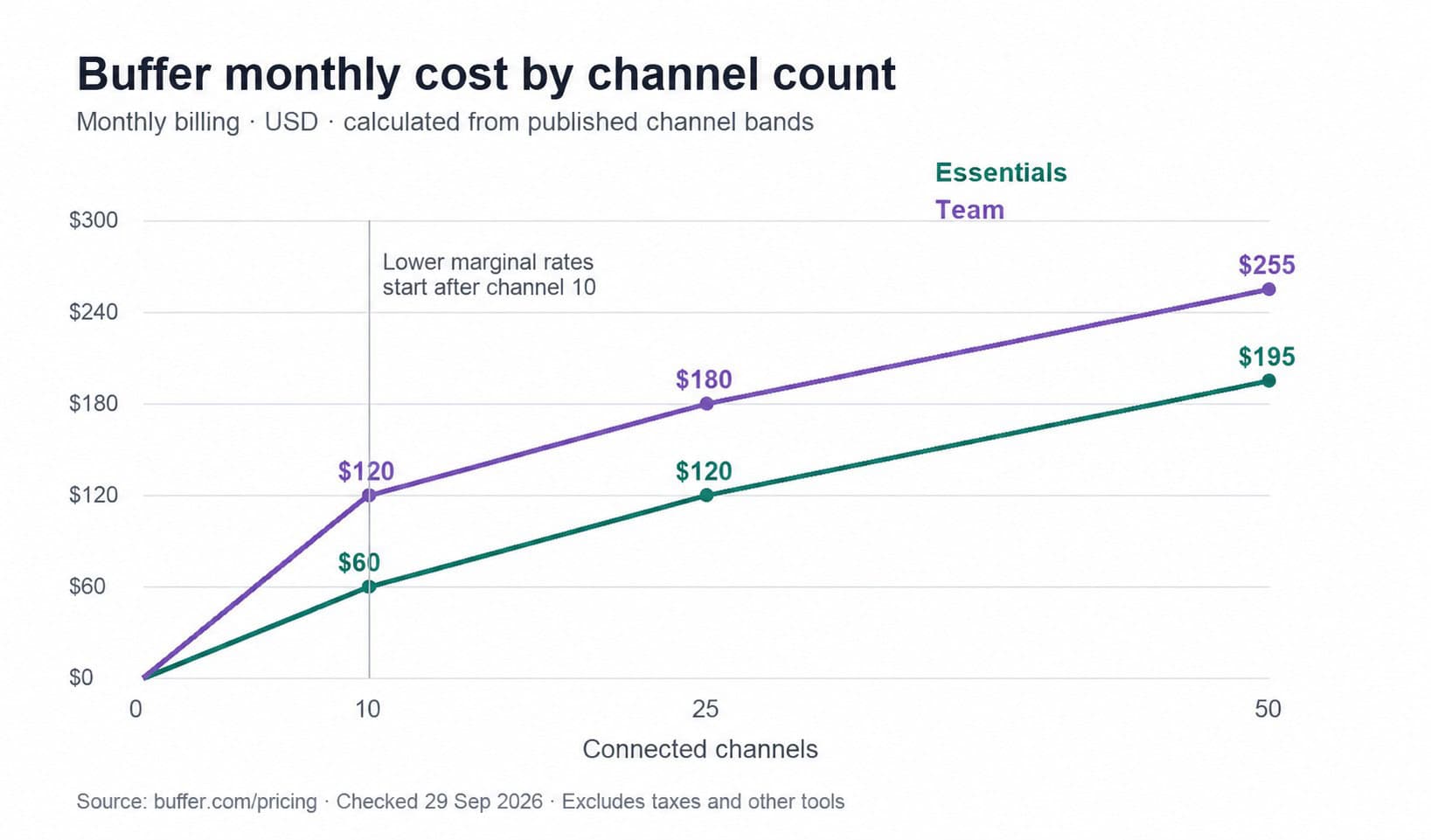
Original calculation using Buffer’s monthly channel bands. The chart shows subscription costs, not customer results or savings from automation.
Avoid applying the annual discount twice
The $5 Essentials and $10 Team headline equivalents already reflect annual billing. Do not take another percentage off them. For one Essentials channel, $60 annually versus twelve $6 payments is a $12 saving, or about 16.7% of the monthly-payment total. Dollar totals make the comparison clearer than a rounded discount slogan.
Annual billing is easier to justify when you expect to retain the same accounts. If you are testing new channels or onboarding short-term clients, compare that saving with the value of paying month by month.
Is Buffer Free enough for an evergreen workflow?
The free queue limit is often misunderstood. Buffer’s scheduling-limit guidance says Free can hold ten scheduled posts per channel at one time. It is not a ten-post monthly allowance. Publishing a post frees a slot. Paid plans have a 5,000-post per-channel fair-use queue cap.
That changes the decision. At one scheduled post a day, ten slots hold about ten days of content. At two a day, they hold about five days. These are simple capacity examples, not recommended posting frequencies.
Free may work if one person manages up to three channels and can keep a short queue supplied. A paid plan becomes more useful when you want to prepare a longer run of content or need another paid feature. If you are new to the queue, our guide to adding posts to Buffer explains how the workflow fits together.
One detail to confirm before repeatedly swapping accounts: Buffer’s help pages describe an eight-connection lifetime restriction on Free, but their wording differs on whether it applies overall or per social network. The plan comparison and channel-connection guide currently differ. Ask Buffer to confirm the applicable limit if account rotation is part of your plan.
Budget for the work around the subscription
Buffer’s bill covers the software. Your publishing budget also includes preparing posts, checking links and offers, answering comments, and reviewing results.
EvergreenFeed complements Buffer by keeping reusable posts in content buckets and sending selected content into the Buffer queue on a schedule. It addresses the repeated task of putting evergreen content back into circulation. Buffer remains part of that workflow, and its channel and queue limits still matter.
Use this simple monthly budget:
Buffer subscription + other tool charges + content preparation time + review time.
For example, take a hypothetical five-channel Essentials setup on monthly billing. Buffer costs $30. If preparing and reviewing that month’s posts takes four hours, valued at $30 an hour, the combined cost is $150 before any other tool charges. If your own measured process later removes one of those hours, the time value is $30. This is a planning example, not a claim that EvergreenFeed will save a particular amount.
For an additional tool, divide its monthly charge by your hourly time value to find the break-even time saving. A hypothetical $15 tool needs to save half an hour at $30 an hour. Use the price offered for your actual account; this example is not an EvergreenFeed price quote.
Automation also needs a maintenance routine. A reusable post can become inaccurate when a product, offer or linked page changes. Reserve time to review the library, remove expired promotions and adjust the mix instead of filling every available slot simply because the plan allows it.
Choose a plan around the workflow you will run
Start with an account list and one realistic week of content. Then decide:
- Free: one operator, up to three connected channels and a short queue meet the need.
- Essentials: one operator needs paid publishing capacity or analytics, without shared approvals.
- Team: multiple people need access, permissions or an approval process.
Before buying annually, test the formats you actually publish and the review process you expect colleagues to follow. A cheaper subscription is little help if an important step still needs a separate workaround.
If you already like Buffer and your recurring job is refilling it with useful older content, explore EvergreenFeed’s bucket-based workflow. If the publishing setup itself no longer fits, our Buffer alternatives guide can help you compare a broader change. Either way, price the full channel count and the work it takes to keep those channels useful.