James
James
When people hear "automating Instagram," they often picture a robotic, soulless feed. But that’s not what we’re talking about here.
Smart automation is about using tools to schedule and publish your content ahead of time. Think of it as creating a library of your best posts and building a calendar that tools like EvergreenFeed and Buffer can draw from. This system handles the repetitive task of posting, freeing you up to focus on what really matters: strategy and genuine connection.
Why Smart Automation Is Your Secret Weapon on Instagram
Let’s get real for a second. Keeping an Instagram account active can feel like a never-ending hamster wheel of creating, posting, and engaging. It’s a recipe for burnout, and it often leads to scrambling for last-minute content, where quality takes a backseat to just getting something out there.
This is exactly where automating your Instagram posts becomes a game-changer. It’s not about being impersonal; it’s about creating a dependable workflow that liberates you from the tyranny of hitting "publish" all day long. By setting up a smart content pipeline, you get your time back—time you can pour into the activities that actually grow your account.
Reclaim Your Time for High-Impact Tasks
Picture this: your foundational content is already scheduled out for weeks, maybe even months. What would you do with all that extra time you used to spend just on the mechanics of posting?
You could finally focus on the important stuff:
- Deeper Community Engagement: Instead of rushed replies, you can have meaningful conversations in your comments and DMs, building real relationships.
- Strategic Content Creation: You'll have the mental space to produce higher-quality, more creative posts, Reels, and Stories—no more rushed, mediocre content.
- Performance Analysis: Actually dive into your analytics to figure out what your audience loves and use that data to make your strategy even better.
The point of automation isn't to "set it and forget it." It’s to "schedule and connect." It takes care of the grunt work so you can put your energy into the human side of social media.
This guide will walk you through setting up this exact system using EvergreenFeed and Buffer. We’ll move past the daily content scramble and build a sustainable, effective Instagram presence.
And if you want to zoom out and see how this fits into the bigger picture, you can always explore broader social media strategies and insights to complement your new automation workflow. Whether you're flying solo, running a small business, or managing accounts for a living, this approach will fundamentally change your Instagram game for the better.
Building Your Automation Engine with EvergreenFeed and Buffer
Alright, let's get practical. The first real step to automating your Instagram is getting your tools to talk to each other. This is where you build the foundation for a system that will genuinely save you hours every week. By hooking up EvergreenFeed to your Buffer account, you create a powerhouse combo. Buffer becomes the delivery truck, handling the direct posting to Instagram, while EvergreenFeed acts as the strategic brain, feeding your best content into the pipeline.
I like to think of EvergreenFeed as my content library and Buffer as the courier. My job is to organize that library so the courier always has the right packages ready to go out at the perfect time. The good news? This initial setup is surprisingly quick.
For tools like EvergreenFeed that piggyback on Buffer, getting your schedule running is one of the easiest automation wins you can get. Seriously, it takes about 5 minutes of setup time. Once you automate the repetitive task of posting, you free up your team to focus on what actually matters—creating amazing content and talking to your community, instead of just hitting "publish" at peak hours.
First Things First: Connecting Your Accounts
The integration itself is dead simple. Inside your EvergreenFeed dashboard, you'll see an option to connect your social media accounts. Since EvergreenFeed works its magic through Buffer, it will ask you to authorize access to your Buffer account. This assumes, of course, that you've already linked your Instagram Business profile to Buffer.
Once you grant permission, EvergreenFeed automatically pulls in the social profiles you have set up in Buffer. That means any Instagram, Facebook, or other accounts you manage there will instantly become available for your new evergreen scheduling system. It’s this direct link that makes the whole workflow feel so seamless. If you need a refresher, we've got a guide to using Buffer for your social media that walks you through it.
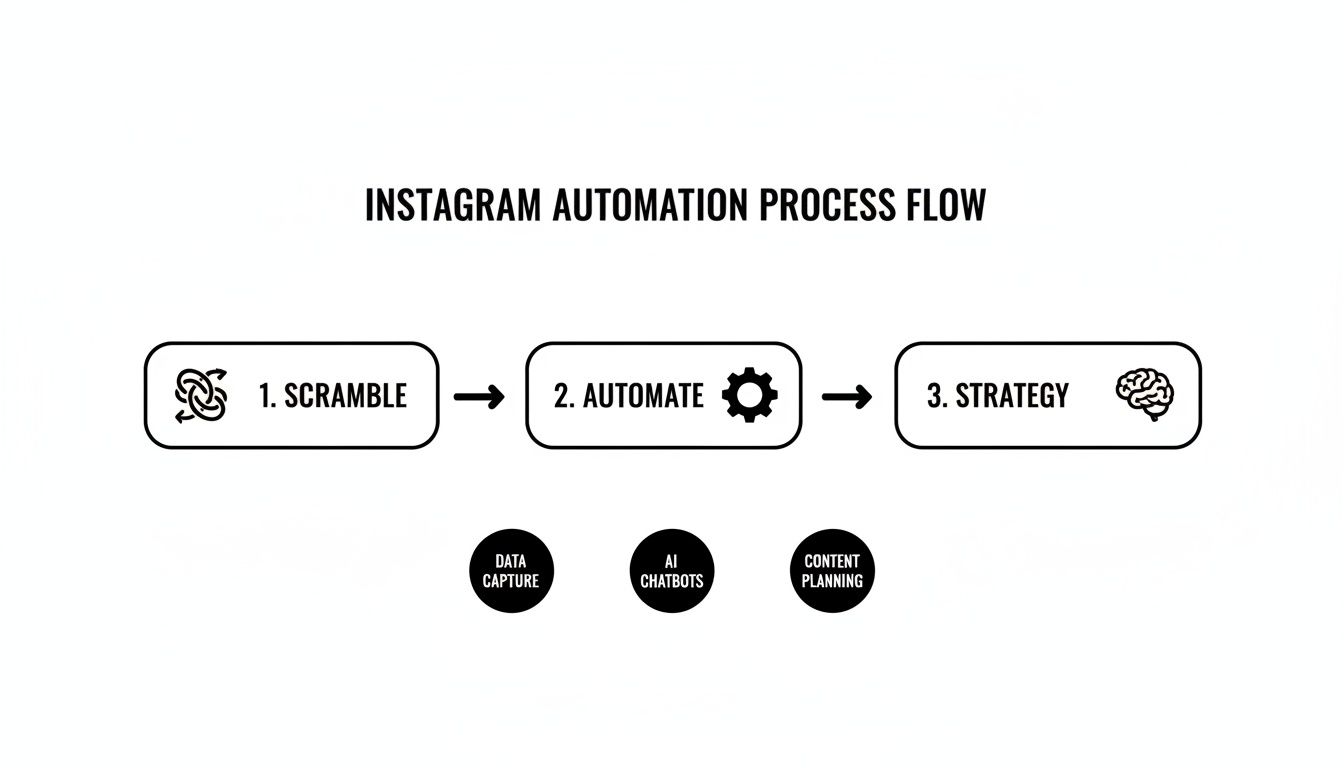
This flowchart really captures the shift from manual chaos to a streamlined, strategic workflow. The big idea here is that automation isn't just about scheduling—it's about turning a tangled mess of tasks into a clear, repeatable strategy that actually works.
Creating Your Content Buckets
With your accounts connected, the real strategic work can begin: setting up your content "buckets." Buckets are just a fancy name for categories you create to organize your posts. This is, without a doubt, the most important part of building your automation engine. Why? Because it’s what keeps your feed balanced and tied to your actual marketing goals.
Without categories, your automation would just be random noise. But with them, it becomes intentional. You can tell EvergreenFeed to pull from specific buckets on certain days, which stops you from, say, accidentally posting three salesy updates in a row.
Pro Tip: Your content buckets should be a direct reflection of your content pillars. If you don't have defined pillars yet, this is the perfect excuse to create them. Think about the main themes and value you consistently want to deliver to your audience.
Let's imagine an e-commerce brand that sells sustainable home goods. Here’s how they might structure their buckets in EvergreenFeed:
- Product Spotlights: High-quality images and carousels of specific products, highlighting their eco-friendly features.
- Behind the Scenes: Content that shows the team, the making-of process, or the sustainable materials used. This builds trust and transparency like nothing else.
- Educational Tips: Posts giving advice on sustainable living or how to care for their products. This provides real value that isn't just a sales pitch.
- User-Generated Content (UGC): Resharing photos from happy customers. This is powerful social proof, and it's free!
- Company Values & Mission: Posts that reinforce the brand’s commitment to sustainability and its community.
With this structure, the brand can create a schedule that automatically pulls from "Educational Tips" on Tuesdays, "UGC" on Fridays, and "Product Spotlights" over the weekend. The result is a dynamic, engaging feed that runs itself, day in and day out.
Designing a Winning Evergreen Content Schedule
Alright, you've connected your tools—that was the simple part. Now for the real magic: strategy. This is where you graduate from just scheduling posts to building a smart, effective content machine that works for you around the clock. A solid schedule isn't about just plugging holes in your calendar; it's about deeply understanding what your audience wants and delivering it when they're most likely to see it.
The whole system hinges on one thing: filling your content buckets with genuinely evergreen material. We're talking about posts that will be just as relevant and valuable six months from now as they are today. Think about foundational tips, inspiring case studies, answers to common questions, or those behind-the-scenes glimpses that make your brand feel human.
This is how you keep your automated feed feeling fresh and useful, not like a stale, repetitive robot. If you want to dive deeper into this concept, we have a complete guide to building an evergreen content strategy that's worth a read.
Mixing Your Media for Maximum Impact
Nothing kills engagement faster than a monotonous feed. To keep people interested and coming back for more, your automated schedule absolutely must feature a healthy mix of different post formats. Each one plays a different role, and using them together is the key to growth.
Let's break down the heavy hitters:
- Static Images: These are your go-to for powerful quotes, quick-hit tips, or a stunning product shot. They're easy to digest and perfect for reinforcing your brand's visual identity.
- Carousels: Got a story to tell or a process to explain? Carousels are your best friend. They're fantastic for step-by-step guides and keep people swiping, which the algorithm loves.
- Reels: Right now, Reels are the undisputed champions for reaching new people. Use them for quick tutorials, behind-the-scenes fun, or jumping on a trend to show off your brand's personality.
The data backs this up. While carousels often pull in the highest engagement rates, Reels are a powerhouse, generating far more interactions than standard posts. They are a non-negotiable part of any serious Instagram automation strategy.
Building a Smart Posting Schedule in EvergreenFeed
Now it’s time to put all the pieces together inside EvergreenFeed. This is where your content buckets and media library become a living, breathing schedule. The goal is to establish a weekly rhythm that feels deliberate and syncs up with your audience's online habits.
A great way to start is by theming your days. Assign a specific content bucket to each day of the week to ensure your feed stays balanced and doesn't get stuck in a rut.
For a freelance graphic designer, it might look something like this:
- Monday: Pull from the "Portfolio Showcase" bucket (Carousels)
- Tuesday: Pull from the "Design Tips" bucket (Reels)
- Wednesday: Pull from the "Client Testimonials" bucket (Static Images)
- Thursday: Pull from the "Behind-the-Scenes" bucket (Reels)
- Friday: Pull from the "Industry Insights" bucket (Carousels)
This simple structure turns your automation into a predictable, value-packed experience. Your followers will actually start looking forward to your "Design Tips" on Tuesdays, which is how you build a loyal community.
To help you visualize this, here’s what a structured weekly schedule could look like in practice.
Sample Weekly Content Schedule in EvergreenFeed
This table shows how a business could map out its weekly posts using different buckets for specific time slots, targeting peak engagement periods.
| Day | Morning Slot (9 AM) | Afternoon Slot (2 PM) | Evening Slot (7 PM) |
|---|---|---|---|
| Monday | "Motivational Quotes" Bucket | "Blog Post Promo" Bucket | "Portfolio Showcase" Bucket |
| Tuesday | "Quick Tips" Bucket (Reel) | – | "Meet the Team" Bucket |
| Wednesday | "Industry News" Bucket | "User-Generated Content" Bucket | – |
| Thursday | "Behind-the-Scenes" Bucket | – | "Case Study" Bucket (Carousel) |
| Friday | "Q&A Friday" Bucket (Image) | "Company Culture" Bucket | "Weekend Vibe" Bucket |
This kind of planning ensures you’re not just posting randomly but are strategically delivering varied and valuable content throughout the week.
From there, you can hop into Buffer to set the exact posting times for each day. Dig into your Instagram Insights to find out when your audience is most active and schedule your posts to hit those peak windows. Your "Portfolio Showcase" might do best at 7 PM on a Monday, while your quick "Design Tip" Reel gets the most traction at 11 AM on Tuesday.
This is the difference between simply automating your posts and building a thoughtful, high-performing content system that delivers consistent results without chaining you to your desk.
Advanced Automation Beyond Just Scheduling Posts
So far, we’ve covered how to get your content schedule dialed in, which is a massive time-saver. But the real magic happens when you build systems that do more than just post for you. It's about creating genuine, one-on-one interactions with your audience, but doing it at scale to turn followers into real leads and customers.
This is where we get into the nitty-gritty of Instagram's API and automated Direct Messages (DMs). When you use them thoughtfully, it’s not spammy or robotic at all. It’s a way to give your audience instant value and make their experience with your brand completely seamless. You're essentially meeting them exactly where they are, with what they want, the very moment they ask for it.
Unlocking Conversational Automation with DMs
Imagine this: someone finds your profile through a Reel, loves your stuff, and comments with a keyword you've designated, like "GUIDE." Instead of you spotting that comment hours later and fumbling to send a link, an automated system can instantly reply and slide into their DMs with that free resource.
That immediate delivery is incredibly powerful. You're capitalizing on their interest when it's at its absolute peak, giving them instant gratification and making your brand look incredibly helpful and on-the-ball. A few years ago, this kind of responsiveness was only possible if you had a community manager glued to the account 24/7.
Here are a few ways DM automation can completely change the game:
- Keyword Triggers in Comments: Someone comments "WAITLIST" on your post about an upcoming course, and bam—they get a DM with the signup link.
- Story Mentions: A happy customer tags you in their Story, and they immediately get a thank-you message, maybe even with a little discount code as a surprise.
- New Follower Welcome: A new person joins your community and receives a warm welcome DM that points them toward your best, most valuable content.
This isn't just about being efficient. It's about engineering a better user experience. By eliminating the wait time, you make it ridiculously easy for people to take the next step with your brand, whether that’s grabbing a lead magnet or getting on your launch list.
The numbers back this up in a big way. Studies have shown that instant, automated DM replies can drive 25-55% higher conversion rates compared to manual responses that trickle in hours later. Even better, using DMs to capture emails can result in opt-in rates between 20-60%. That blows the typical 2-8% from a standard website landing page out of the water. For more on this, check out these Instagram DM automation strategies on creatorflow.so.
A Real-World Case Study in Action
Let’s make this super practical. Picture a financial coach who's put together an amazing PDF guide called "5 Steps to Budgeting for Your First Home." Her goal isn't just to hand out the guide; she wants to capture email addresses for her newsletter and coaching programs.
Here’s the simple but brilliant DM automation she sets up:
- The Content: She creates a high-value Instagram Reel teasing one of the five steps from her guide. It’s quick, helpful, and leaves people wanting more.
- The Call to Action (CTA): At the end of the Reel and in the caption, the ask is perfectly clear: "Want my full free budgeting guide? Just comment the word BUDGET below, and I'll send it straight to your DMs!"
- The Automation Trigger: She uses an authorized third-party tool like ManyChat to connect to Instagram's API. She creates a rule that listens for the specific comment "BUDGET" on that one Reel.
- The Automated Flow: The moment someone comments, two things happen instantly. First, the system posts a public reply to their comment saying something like, "Just sent it to your DMs! Enjoy!" This adds social proof. Second, it sends a direct message to that person.
- The DM Conversation: The first DM is friendly and direct: "Hey! So excited for you to get the budgeting guide. To make sure I'm sending it to the right place, what's the best email address I can send it to?"
- Lead Capture: The user simply replies with their email right there in the DM. The tool captures it and can be set up to automatically add it to her email list in ConvertKit or Mailchimp.
- The Delivery: As soon as the email is provided, a final automated message goes out: "Awesome, it’s on its way to your inbox now! Let me know what you think."
This entire exchange runs on autopilot, whether the coach is in a client meeting, asleep, or on vacation. She’s built a scalable lead-gen machine right inside of Instagram, turning her profile from a simple content feed into a core part of her business funnel. This is what's truly possible when you think beyond just scheduling posts.
How to Measure and Refine Your Automation Strategy
Automating your Instagram posts saves a ton of time, but that’s not where the real magic happens. The true power is unlocked when you start digging into the results. If you're not measuring your performance, you're essentially just shouting into the void. To turn this whole system into a genuine growth engine, you need to build a data-driven feedback loop—a simple process where you track what works, figure out why it works, and then do more of it.
Don't worry, this isn't about getting lost in massive spreadsheets. It’s about asking the right questions and using your analytics to find the answers. For this, you’ll want to lean on a combination of Buffer's built-in analytics and Instagram's own native Insights to get the full story.
Identifying Your Core Performance Indicators
Before you can fine-tune anything, you have to define what success actually looks like for you. It's easy to get distracted by vanity metrics like your total follower count, but you need to focus on the numbers that signal real audience connection and, more importantly, business impact. These are the Key Performance Indicators (KPIs) that matter.
I'd suggest starting with these essential metrics:
- Engagement Rate by Content Type: Don’t just glance at your overall engagement. Isolate it. Are your Reels earning more saves than your carousels? Are the static images from your "Tips" bucket sparking the most comments?
- Website Clicks by Post: If driving traffic is a primary goal, this is your north star metric. You need to know which specific posts are compelling people to actually tap that link in your bio.
- DM Conversion Rates: For any automated DMs you’ve set up, track how many people who trigger the flow actually complete the action you want, like signing up for a newsletter.
- Best Performing Time Slots: Use your analytics to confirm if your scheduled times are hitting the sweet spot. You might be surprised to find your audience is more active at a time you hadn't considered.
To really make sure your Instagram efforts translate into business growth, it helps to have a solid grasp of fundamental conversion optimization strategies. This is what helps you turn those likes and comments into actual leads and sales.
The goal is to move from "I think this post will do well" to "I know this post will do well because the data says so." This is the critical shift from guessing to strategizing.
By homing in on these specific data points, you’ll start to see clear patterns emerge from all the noise. That's where the actionable insights are hiding.
Creating Your Data-Driven Feedback Loop
Once you've let your automated schedule run for a few weeks, you'll have enough data to start making smart decisions. This isn’t complicated; it’s a simple, repeatable process for refining your entire approach.
- Analyze Performance Weekly: Block out 30 minutes on your calendar each week to review your analytics. Your mission is to spot the outliers—the posts that massively over-performed or completely flopped.
- Identify Clear Patterns: Start connecting the dots between performance and your content buckets. You might discover that carousels from your "Case Studies" bucket drive the most website clicks on Thursdays. Or perhaps Reels from your "Behind-the-Scenes" bucket consistently get the highest reach.
- Tweak Your EvergreenFeed Schedule: Armed with these insights, pop into EvergreenFeed and make some adjustments. If case study carousels are driving traffic, double down on them. Schedule them more often or experiment with different time slots.
- Refine Your Content Buckets: If a particular bucket is constantly falling flat, it's time for an honest look. Is the content itself not resonating, or is the angle just wrong? Use what you’ve learned from your winning posts to improve or even completely replace the content in that bucket.
This cycle of analyzing, identifying, and tweaking is what transforms a static, robotic feed into a dynamic, intelligent one that actually gets results. If you want to dive deeper into this, you can learn more about https://www.evergreenfeed.com/blog/how-to-measure-social-media-roi/ and tie your efforts directly to the bottom line.
Common Questions About Automating Instagram Posts
Even with the best tools and a solid plan, jumping into Instagram automation can feel a little uncertain. That's perfectly normal. You want to make sure you're doing things the right way.
Let's walk through some of the questions that come up most often, so you can move forward feeling confident. The biggest one is usually about safety, so let's start there.
Is Automating Instagram Posts Safe for My Account?
Yes, absolutely—if you're using the right tools. The key is to stick with schedulers that play by Instagram's rules and use its official API. Platforms like Buffer, which is what EvergreenFeed integrates with, are authorized partners.
These legitimate tools are designed for scheduling content and tracking performance, nothing more. They won't engage in risky, spam-like behavior such as auto-following, auto-liking, or posting generic comments. Instagram puts API limits in place for a reason: to protect users from spam. Any tool that respects those limits is a safe bet for your account.
What Content Works Best for an Automated Evergreen Strategy?
The whole idea behind an evergreen strategy is building a library of content that stays relevant for a long, long time. You want posts that will be just as helpful and interesting to someone in six months as they are today.
Think in terms of your core content pillars. What are the foundational topics for your brand?
- Timeless Tips: Advice that solves a fundamental problem your audience faces.
- Frequently Asked Questions: Your go-to answers for the questions you hear over and over.
- Behind-the-Scenes Looks: A peek into your process, your team, or what your brand stands for.
- Client Wins and Case Studies: This is powerful social proof that never expires.
What should you avoid? Anything time-sensitive. Flash sales, reactions to breaking news, or posts about a specific event are best posted manually in the moment.
How Do I Keep My Feed Authentic with Automation?
This is a really important question. The truth is, authenticity comes from your content, not your posting method. Automation is just a delivery mechanism. It handles the "when" so you can focus entirely on the "what" and "why."
The time you get back from not having to manually hit "publish" every day is time you can reinvest into genuine community building. That's where real authenticity comes from.
True connection is built in the trenches—responding to comments, having real conversations in DMs, and creating content that truly sounds like you. Automating your posting schedule frees you up to do more of that, not less.
How Often Should I Post on Instagram Using an Automated Schedule?
Here's the bottom line: consistency will always beat frequency. Posting a bunch of times one day and then disappearing for a week just doesn't work. A steady, predictable rhythm is far more effective for the algorithm and your audience.
For most brands, posting 3-5 times per week is a great place to start. You can use your automation tools to lock that schedule in. After it's been running for a bit, check your Instagram Insights to see when your audience is most active. From there, you can easily tweak your Buffer schedule to match those peak times, making sure every post gets the best possible reach.
Ready to stop the daily content scramble and build a powerful, consistent Instagram presence? EvergreenFeed automates your best content, saving you hours every week so you can focus on growth. Sign up for free and start automating today.