James
James
If you're running a small business, think of social media management software as your personal digital command center. It’s a single platform that pulls all your social accounts—Facebook, Instagram, LinkedIn, you name it—into one clean dashboard. No more bouncing between a dozen browser tabs to post, reply, and see what’s working.
Stop Juggling And Start Streamlining Your Social Media

Does the constant buzz of social media notifications make you feel like you're drowning? You're not alone. For small business owners, trying to keep up with every post, comment, and DM is a huge source of stress.
It’s time for a mindset shift. Social media management software for small business isn't just another complicated tool to master; it's your dedicated digital assistant, ready to take on the busywork.
Imagine one central hub where all your content is neatly organized, your posting schedule runs on autopilot, and every customer conversation lands in a single, unified inbox. This is exactly how you can compete with the big guys without completely burning out.
Your Virtual Marketing Team In A Box
The right software is like having a marketing team in a box. It gives you the power to build a polished, consistent online presence that looks like it's run by a major brand, all without the backbreaking manual effort or sky-high budget.
This isn't a small trend. The social media management software market is booming and expected to reach $53.29 billion by 2029. Why? Because small businesses are scrambling to keep up and make their workflows more efficient.
A good tool gives you back your most valuable resource: time. Instead of logging into each platform every single day, you can:
- Plan Ahead: Set up weeks or even months of content in just one afternoon.
- Stay Consistent: Keep a steady flow of posts going to keep your audience hooked.
- Engage Efficiently: Handle all your comments and messages from one organized dashboard.
- Measure What Matters: See at a glance which posts are hitting the mark and which are falling flat.
This kind of tool changes social media from a relentless daily chore into a powerful, strategic asset. It lets you get back to running your business while your marketing engine hums along in the background, building your brand and connecting with customers.
The Path to Effortless Consistency
Ultimately, the real win is creating a reliable and professional brand voice online. When people see you consistently sharing valuable content, they start to trust you. You can learn more about how to automate social media posting and see how a "set-it-and-forget-it" system can keep your feed alive and engaging.
Achieving that level of consistency manually is nearly impossible without letting other critical parts of your business slide. That's the problem this software solves.
Unlock Growth With Measurable Social Media ROI
To get real growth from social media, you have to move beyond just “being there.” The real magic of a social media management software for small business is its power to show you what’s actually working, delivering tangible results you can see in your bank account. It’s what turns social media from a daily chore into a genuine business investment.
The first thing you’ll notice is how much time you get back. Instead of logging in every single day to post, these tools let you schedule everything in advance. You can knock out a week or even a month's worth of content in one sitting. Suddenly, you have hours back to focus on things that make you money, like talking to customers or dreaming up your next big idea.
This consistency also does wonders for your brand. When your audience sees a steady flow of high-quality content, it builds a professional, unified voice. That reliability is what builds the trust that turns casual followers into loyal customers.
From Guesswork To Data-Driven Decisions
Let’s be honest—without the right tools, a lot of social media marketing feels like throwing spaghetti at the wall and hoping something sticks. You post, cross your fingers, and hope for the best. A good management platform replaces that uncertainty with crystal-clear analytics that connect what you post to actual business outcomes.
You can finally get concrete answers to the important questions:
- What kind of content is actually sending people to my website?
- Are my Instagram Stories bringing in more leads than my Facebook posts?
- When are my followers online and most likely to engage?
This isn't just interesting data; it's a roadmap. It tells you exactly where to focus your energy and what to stop wasting time on. You can fine-tune your strategy based on real evidence, making sure every post serves a purpose. For a deeper dive, check out our guide on how to measure social media ROI and really start tracking your success.
Connecting Social Media Activity To Your Bottom Line
There’s a reason the social media management market exploded to $27.03 billion in 2024 and is on track to hit $124.63 billion by 2032—small businesses are leading the charge. With over 5.17 billion people on social media, you have to be where your customers are. These tools make it possible for small businesses to compete, with studies showing that 93% of users post more consistently after getting one. You can find more data on this trend over at fortunebusinessinsights.com.
This is about more than just saving time; it's about making smarter financial decisions. When you know which posts lead directly to sales, you can put your marketing budget where it counts and get a much better return. The right software turns your social media from a cost center into a powerful revenue engine.
The core value is simple: Stop spending time on social media and start investing it. When you can directly link your efforts to website traffic, lead generation, and sales, you're no longer just posting—you're building a sustainable, profitable business.
Essential Features In Your Social Media Toolkit
When you start shopping for social media software, the sheer number of features can feel dizzying. Every tool promises the world. But here's the secret: you don't need every bell and whistle.
The trick is to cut through the noise and focus on the core functions that will actually make a difference for your small business. Think of it like putting together a toolbox. You start with the essentials—the hammer, screwdriver, and wrench—before you even think about the fancy power tools. These are your non-negotiables.
Your Strategic Command Center: The Content Calendar
Trying to manage social media without a content calendar is like trying to direct a play without a script. It’s chaotic, stressful, and you’re always reacting instead of planning. A visual content calendar is your strategic command center.
It gives you a bird's-eye view of everything you have planned across all your channels. You can map out your content mix, making sure you’re balancing promotions with helpful tips, behind-the-scenes content, and customer stories. This kind of foresight stops the last-minute panic of "What do I post today?!" and helps you build a brand story that makes sense over time.
The Efficiency Engine: Bulk Scheduling And Automation
This one is a game-changer, especially for time-strapped entrepreneurs. Bulk scheduling lets you sit down for a few hours and load up an entire week—or even a month—of social media content at once.
Instead of needing to log in and post something new every single day, you can batch the work, set it, and forget it. The software takes care of posting at the optimal times, freeing you up to focus on running your business. This is why social media management software for small business has become so popular; the efficiency gains are massive.
The Communications Hub: A Unified Inbox
If you're constantly bouncing between Facebook messages, Instagram DMs, X replies, and LinkedIn comments, you’re bound to miss something important. A unified inbox is the perfect solution. It pulls all your DMs, comments, and mentions from every platform into one clean, manageable feed.
This feature turns customer service from a frantic scramble into an organized process. You can reply faster, assign conversations to team members, and ensure no customer query ever falls through the cracks.
Turning Data Into Action: Analytics And Reporting
Posting content without looking at the data is just guessing. Solid analytics and reporting features are what separate a professional strategy from a hobby. They help you understand what’s actually working with your audience, moving you beyond vanity metrics like likes.
Your software should give you clear, easy-to-read reports on the metrics that drive growth:
- Engagement Rate: Are people actually interacting with your posts?
- Reach and Impressions: How many eyeballs are you getting on your content?
- Click-Through Rate (CTR): Are your followers clicking the links you share?
- Best Times to Post: When is your audience online and ready to engage?
These insights are your roadmap. They tell you what to post more of, which platforms deserve your attention, and how to tweak your schedule for the biggest impact. Of course, a great management tool is only part of the equation; you'll also want to explore dedicated social media content creation tools to produce stunning visuals and copy.
As you evaluate different platforms, it's helpful to distinguish between the "must-haves" and the "nice-to-haves."
Essential vs. Advanced Features in Social Media Software
| Feature Category | Essential for Startups | Advanced for Growth |
|---|---|---|
| Publishing | Visual Calendar, Bulk Scheduling | Content Approval Workflows, AI Post Suggestions |
| Engagement | Unified Inbox for DMs & Comments | Automated Inbox Rules, Sentiment Analysis |
| Analytics | Core Metrics (Engagement, Reach, Clicks) | Competitor Benchmarking, Custom Report Builder |
| Collaboration | Single User Access | Multi-User Roles & Permissions, Task Assignment |
| Listening | Basic Keyword & Mention Tracking | Advanced Trend Monitoring, Share of Voice |
This table should help you prioritize. Start with a tool that nails the essentials. You can always upgrade to a plan with more advanced features as your business—and your social media presence—grows.
How To Choose The Right Software For Your Business

Let's be honest: picking a social media management software for small business can feel like a huge task. But it doesn't have to be. Once you have a game plan, you can easily sift through the noise and find the tool that’s a perfect match. The secret isn't finding the one with the most bells and whistles; it's about finding the one that solves your biggest headaches.
Think of it like buying a car. You wouldn't get a giant SUV if all you do is zip around the city. The right choice is all about your specific needs. The best way to start is by asking a few simple questions to map out what you're actually looking for.
Start With Your Core Needs
Before you even glance at a single pricing page, hit pause and take stock of your own business. Getting clear on what you need is your compass for this journey. It’ll point you to the right solution and, just as importantly, steer you away from paying for fancy features you’ll never touch.
This quick self-audit is easily the most critical part of the whole process. Be real about your goals, your time, and your team.
Here are the essential questions to get you started:
- Where do my customers actually hang out? Pinpoint the 2-3 social networks that matter most. There's zero reason to pay for a tool that supports ten different platforms if your audience lives on Instagram and Facebook.
- How many people need to use this? Is it just you, or do you have a small team that needs to jump in and collaborate? The user count can make a big difference in cost.
- What’s my real-world monthly budget? Figure out a number you’re truly comfortable with and stick to it. Plans can swing from $30 to over $200 a month, so knowing your spending limit from the get-go is key.
Understand Pricing Models To Avoid Surprises
Software pricing can be a bit of a maze, often designed to lure you in with a low starting price. If you know how the common pricing models work, you can spot potential hidden costs and find a tool that offers real long-term value.
Most tools stick to one of these three structures:
- Tiered Plans: This is the one you’ll see most often. Features are bundled into different levels, and you pay more to unlock advanced tools like deep-dive analytics or team workflows.
- Per-User Pricing: Some platforms just charge a flat fee for every person who needs an account. This can be a bargain for solopreneurs but gets pricey fast if your team starts to grow.
- Per-Profile Pricing: A few tools base their price on how many social media accounts you link up. This is fantastic if you manage a small online presence but less ideal if you're handling multiple brands or clients.
Your best defense against overspending is to start with a lower-cost plan that covers your essentials. You can almost always upgrade later as your business needs expand. Don't pay for advanced features until you actually need them.
Prioritize Usability And Support
Even the most powerful software on the planet is worthless if you can't figure out how to use it. For a busy small business owner, a clean, intuitive dashboard isn't a luxury—it's a must-have. You need something that makes your life easier, not more complicated.
Good customer support is just as crucial. When something inevitably goes wrong, you need to know help is just a click or a call away. Look for platforms that offer live chat, quick email responses, or a well-stocked help center.
To see how different options stack up, it's worth checking out reviews of the top social media management tools currently on the market. For an even deeper dive, our own social media management tools comparison guide breaks down the pros and cons.
Ultimately, nothing beats a hands-on test drive. Never, ever commit to a paid plan without trying the software first. Use that free trial period to connect your accounts, schedule a few posts, and poke around the analytics. It's the only way to know for sure if a tool feels right for you and your business.
Your First Week: A Practical Guide to Getting Set Up
Alright, you’ve picked your social media management software. Now what? The real work—and the real payoff—starts now. That first week is crucial for turning your new tool from a fancy subscription into a powerhouse for your business.
Think of it like getting a new, top-of-the-line espresso machine for your coffee shop. It has all the bells and whistles, but you still need to dial in the grind, source the best beans, and train your staff on how to pull the perfect shot. Let’s walk through setting up an efficient workflow from day one, so you can get past the learning curve and start seeing results.
To make this super practical, we'll follow the journey of a fictional small business we can all picture: "The Daily Grind," a local coffee shop. Their goal is simple: build a loyal community, show off their amazing coffee, and get more people walking through the door.
Day 1: Connect Your Digital Front Doors
First thing’s first. You need to connect all of your social media accounts to the software. It might sound basic, but this is the step that makes everything else possible. It’s like giving your new manager the keys to the shop.
Head into your software’s settings and start linking every platform where your customers hang out. For "The Daily Grind," that means connecting:
- Instagram: The perfect spot for showing off gorgeous latte art, the cafe's cozy vibe, and daily specials.
- Facebook: Essential for engaging with the local neighborhood, sharing events, and running targeted ads.
- Google Business Profile: This is a big one. Posting updates here shows up in local searches and on Google Maps, directly driving foot traffic.
Don't rush this part. Double-check that every account is properly authenticated. A failed connection is the number one reason a scheduled post doesn't go out, and getting it right now saves you headaches later. This is the foundation of your entire automated system.
Days 2-3: Stock Your Content Pantry
With your accounts linked, it’s time to get your content organized. One of the biggest mistakes small business owners make is waking up every morning and thinking, "Ugh, what do I post today?" We're going to fix that.
The solution is to create content categories or buckets. Think of it like organizing your pantry shelves: one for promotional flyers, one for fun stories, and one for customer shout-outs. This ensures you always have a balanced mix of posts ready to go.
For "The Daily Grind," the content buckets might look something like this:
- Promotions & Specials (20%): Anything that sells, like "Two-for-One Tuesdays" or the "Latte of the Month."
- Behind the Scenes (30%): Photos of baristas dialing in the espresso, a video of fresh pastries arriving, or a quick tour of the cafe.
- Customer Stories (25%): Featuring regulars (with their permission, of course!), sharing glowing reviews, or reposting photos customers have tagged you in.
- Educational & Fun (25%): A quick tip on brewing better coffee at home, a poll asking about favorite milk alternatives, or a relatable coffee meme.
Creating categories shifts you from a reactive, day-to-day panic to a proactive, strategic mindset. You’re guaranteeing your feed is an interesting mix of selling, engaging, and community building—the secret sauce for long-term growth.
Days 4-5: Schedule Your First Week
Now for the fun part. With your content ideas neatly organized into categories, it's time to actually fill your content calendar. This is where you’ll feel the magic of using social media management software for small business.
Let's put it all together and schedule a full week of posts for "The Daily Grind."
Sample Weekly Social Media Schedule for a Small Retail Business
This template gives you a bird's-eye view of a balanced content calendar. It shows how you can mix and match your content buckets across different platforms to keep your audience engaged all week long.
| Day | Instagram Post | Facebook Post | LinkedIn Post |
|---|---|---|---|
| Monday | Behind the Scenes: A Reel of a barista perfecting latte art. | Fun: "How's your Monday fuel?" poll with coffee options. | Behind the Scenes: "Meet our head barista, Alex!" |
| Tuesday | Promotion: A sharp graphic for "Two-for-One Tuesday." | Promotion: An event page for the "Two-for-One" deal. | N/A |
| Wednesday | Educational: A carousel post with "3 Tips for Better Home Brew." | Customer Story: Share a glowing review from a regular. | N/A |
| Thursday | Behind the Scenes: Story showing fresh pastries arriving. | Educational: Link to a blog on our new single-origin bean. | N/A |
| Friday | Customer Story: Repost a tagged photo from a happy customer. | Event: "Live music tonight! Join us from 7-9 PM." | Company Culture: A team photo celebrating the week. |
Once you’ve scheduled this first week, you'll have a repeatable process that saves you time and keeps you consistent. The daily pressure is gone. Instead of being a chore, your social media presence is now a powerful, automated asset working for your business around the clock.
Common Questions About Social Media Management Software
Jumping into a new tool always brings up a few questions. Before you pull the trigger, you need clear, honest answers to feel confident you're making the right call. Let's walk through some of the biggest questions small business owners have when they're on the hunt for the right software.
This simple workflow breaks down the core setup process. You'll connect your accounts, get your content organized on a calendar, and then let the tool handle the posting for you.
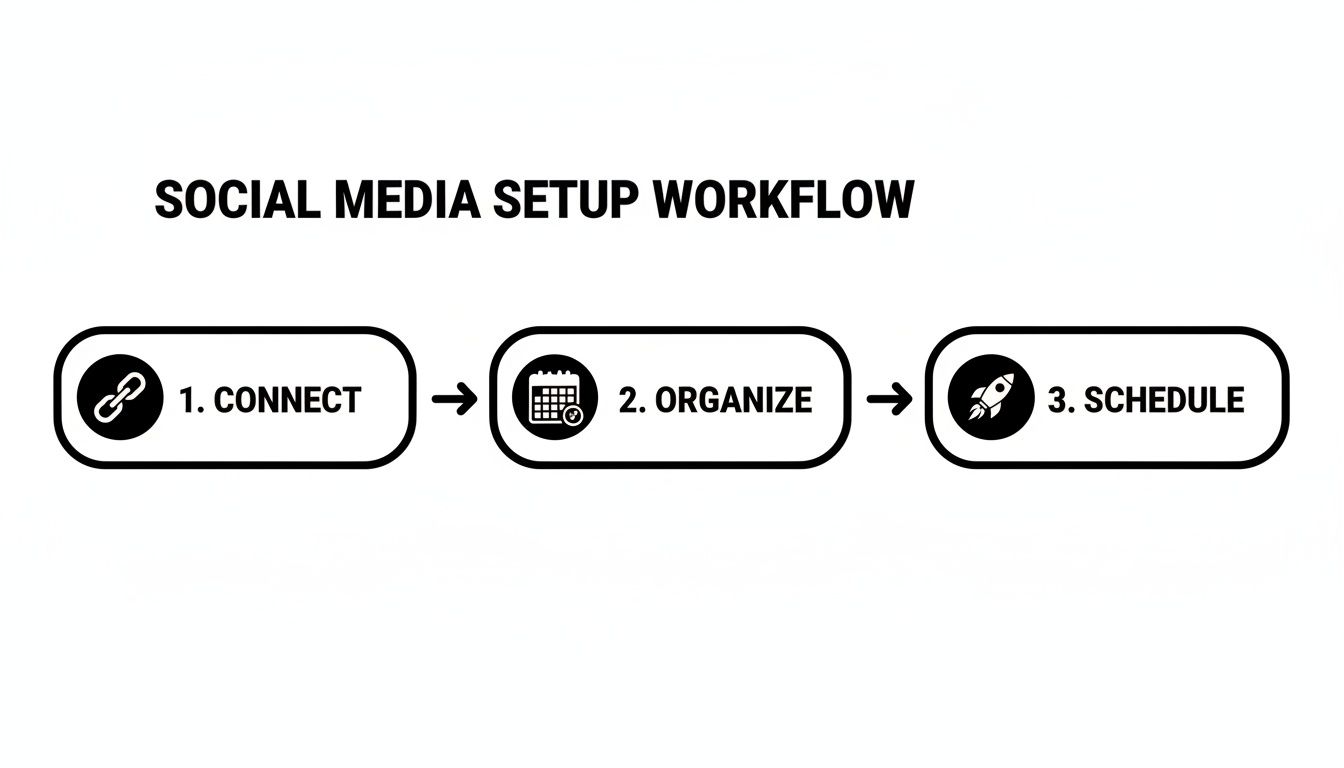
The big idea here is turning your social media from a daily scramble into a smooth, automated system that works for you.
How Much Should a Small Business Budget For Software?
This is always the first question, and thankfully, there’s no single right answer. Most social media management software for small business has entry-level plans that run anywhere from $30 to $99 per month. These usually give you the essentials—scheduling and a single inbox—for one user.
If you need more horsepower, like detailed analytics, team features, or AI-powered content tools, you’ll be looking at plans in the $100 to $200+ per month range. My advice? Start with a plan that solves your biggest headaches right now. You can always upgrade later as your business grows and your needs change.
Can One Tool Truly Manage All My Platforms?
For the most part, absolutely. Any solid tool will connect with the platforms that matter most to small businesses: Facebook, Instagram, LinkedIn, X (what we used to call Twitter), Pinterest, and even Google Business Profile. This lets you run almost everything from a single, centralized dashboard.
The one catch is that no single tool supports every social network out there, especially the niche ones. So, before you commit, just do a quick check to make sure it covers the platforms where your customers hang out.
What's the Difference Between a Scheduler and a Full Suite?
This is a really important distinction to make. A basic scheduler is a one-trick pony, but it's a good trick: it lets you line up your posts to go out later. A full management suite, however, is your entire social media command center.
A management suite is about so much more than just scheduling. It brings all your DMs and comments into one inbox, gives you the analytics to prove your efforts are working, and helps your team collaborate without stepping on each other's toes. It’s the difference between just posting and actually managing your entire social strategy.
How Quickly Can I Expect to See Results?
You’ll feel the impact on your schedule almost immediately. The first week you start batching and scheduling your content, you'll get hours back. It's a huge relief.
As for metrics like follower growth or engagement, that takes a bit more time. When you use a tool to stay consistent, you’ll typically see a real, measurable lift within the first one to three months. The software is what enables you to build that steady, high-quality presence that audiences learn to trust and follow.
Ready to stop juggling a million tabs and finally put your social media on autopilot? EvergreenFeed works beautifully with Buffer to recycle your best content automatically, saving you hours every single week. Start automating your content for free today!