James
James
Juggling multiple Instagram accounts used to be a real headache, but now it's not only possible—it's often a smart business move. You can link up to five accounts right inside the Instagram app for quick switching, or you can bring in a tool like Buffer to post content across a ton of different profiles all from one place.
Why Managing Multiple Instagram Accounts Is a Business Imperative

For a growing brand, the days of relying on a single, one-size-fits-all Instagram profile are pretty much over. What was once a logistical nightmare is now a go-to strategy for connecting with different pockets of your audience in a way that actually feels personal. It all comes down to delivering hyper-relevant content that speaks directly to specific groups.
Think about a global fitness brand. They might run separate accounts for different regions, like @BrandName_USA and @BrandName_EU. This simple split lets them run tailored promotions, feature local athletes, and use slang or cultural references that genuinely connect with their audience. It builds a much tighter community than a generic, worldwide feed ever could.
The Strategic Value of Segmentation
This multi-account strategy goes way beyond just geography. I've seen businesses create entirely separate profiles for different product lines or services, and it works wonders.
For instance, an e-commerce shop specializing in home goods could have one account for sleek, modern furniture and another dedicated to rustic, vintage finds. Each one attracts a super-niche audience that's genuinely interested in that specific style. It's the same reason a marketing agency has to post to multiple Instagram accounts for each of their clients—every brand needs its own unique voice and content plan.
This kind of segmentation is incredibly powerful. With Instagram projected to hit around 2.5 billion monthly active users by 2025 and over 80% of users following at least one business, you have to be targeted to get noticed. You can dig into more of these stats over on Hootsuite's blog.
The real magic of managing multiple accounts isn't just about pushing out more content. It's about delivering the right content to the right people at the right time, which is what truly drives engagement and builds lasting brand loyalty.
Here's a look at the trade-offs when deciding which path is right for your brand.
Single Account vs. Multi-Account Instagram Strategy Comparison
This table breaks down the core differences between sticking to one Instagram account versus expanding to several.
| Aspect | Single Account Strategy | Multi-Account Strategy |
|---|---|---|
| Audience | Broad, general audience with diverse interests. | Niche, highly targeted segments with specific interests. |
| Content | General content designed to appeal to everyone. | Tailored content specific to each audience segment. |
| Brand Voice | A single, consistent brand voice. | Multiple, distinct brand voices for each account. |
| Resources | Less demanding on time and content creation resources. | Requires more resources for content and community management. |
| Engagement | Can be lower due to less relevant content for some followers. | Often higher due to hyper-relevant, targeted content. |
| Best For | Small businesses, personal brands, or companies with a single focus. | Large brands, agencies, or businesses with diverse products or regions. |
Ultimately, choosing between a single or multi-account approach depends on your resources, brand structure, and goals. Understanding these differences is the first step toward building an Instagram presence that works for you.
Setting Up Your Instagram Accounts for Seamless Management
Before you can start juggling multiple Instagram accounts like a pro, you need to get your house in order. Skipping this initial setup is like trying to cook a gourmet meal in a messy kitchen—it’s inefficient, stressful, and you’re almost guaranteed to make a mistake, like posting a client’s new product shot to your personal feed. (We’ve all been there.)
Let’s get everything organized first. A solid grasp of the core Instagram platform is always the best starting point, so you know what it can do on its own before you bring in other tools.
The most straightforward approach is to link your accounts right inside the Instagram app. This is perfect if you're a small business owner or creator handling just a few profiles. Instagram lets you add up to five accounts and swap between them instantly, no more logging in and out. It’s a huge time-saver for quick-fire engagement or checking DMs on the fly.
Linking Accounts in the Native App
Getting your accounts connected inside the app is incredibly simple.
- Just head to your profile and tap the three-line menu icon in the top right.
- Go to Settings and privacy, then scroll all the way down to Add account.
- From there, select Log into existing account and pop in the username and password for the next profile you want to add.
Once you’ve done that, you can switch between accounts by tapping your username at the top of your profile page. It’s a clean, simple system built for convenience.
The goal isn't just to connect accounts; it's to create a system that prevents errors and saves mental energy. A well-organized setup means you can focus on content strategy instead of worrying about logistical mix-ups.
Organizing Accounts in a Third-Party Tool
The native app is great, but its limitations become pretty obvious once you start managing more than five accounts or working as part of a team. That’s when a dedicated social media management platform like Buffer becomes your best friend, acting as a central command center for everything.
To get started, you'll need to connect your Instagram accounts to Buffer by authorizing them through Facebook (a standard step, since Meta owns Instagram). This is what unlocks the more advanced features. Once they're all linked, you can begin organizing them in a way that makes sense for your workflow.
For instance, if you're running a marketing agency, you could create logical groups to keep things tidy:
- Client Group A (Retail): All accounts for your retail clients.
- Client Group B (SaaS): All accounts for your software clients.
- Internal Brands: The agency’s own marketing accounts.
This kind of structure is a lifesaver. It dramatically cuts down the risk of posting to the wrong client’s feed—a mistake that's not only embarrassing but can also damage a relationship. Plus, you can set specific permissions, giving team members access only to the accounts they’re supposed to be working on. This adds a much-needed layer of security and control.
Crafting a Smart Content Scheduling Workflow That Saves You Time
With your accounts linked up and properly organized, it’s time to build a real system for getting content out the door. Just winging it and creating posts whenever you have a spare moment is a surefire way to burn out and get inconsistent results. The goal here is to create a repeatable workflow that saves you precious time but still gives you the flexibility you need to manage multiple Instagram accounts well.
The heart of this entire operation is a shared content calendar. When you use a tool like Buffer, you get a bird's-eye view of your entire posting schedule across every single profile. This high-level perspective is a game-changer for spotting content gaps, avoiding repetitive posts, and making sure each account has a steady, reliable publishing rhythm.
This whole process really boils down to three foundational steps before you even think about scheduling your first post.
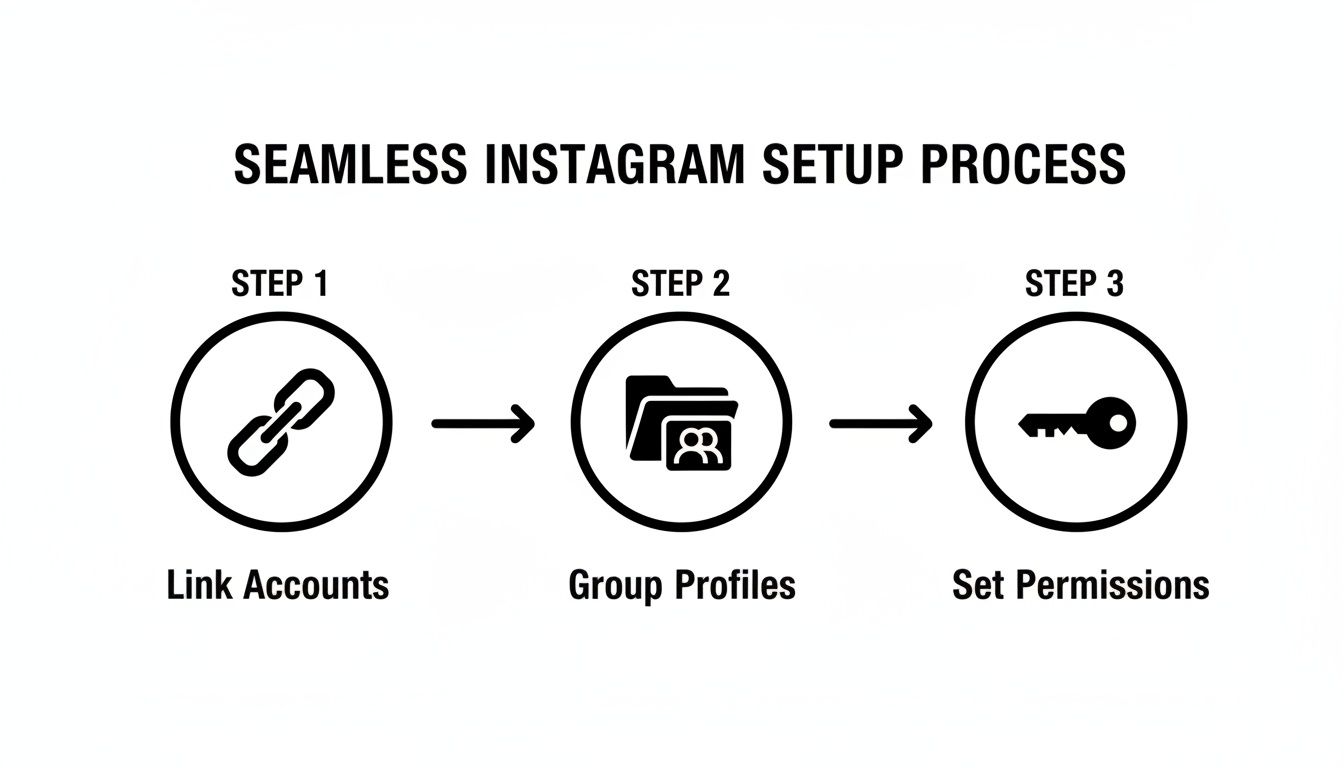
As you can see, a smooth workflow starts with linking the accounts, grouping them in a way that makes sense for your business, and finally, setting the right permissions for your team.
Build Your Content Strategy Around Thematic Buckets
Stop thinking of your content queue as just a random list of posts. A far better approach is to organize everything into thematic content buckets. Think of these as categories that directly map to your marketing goals. This one organizational shift makes it infinitely easier to keep your content mix balanced, so you're not just hammering your audience with promotional stuff 24/7.
Let's say a social media manager is handling accounts for both a local real estate agent and a neighborhood coffee shop. Their content buckets might look something like this:
- For the Real Estate Agent:
- New Listings (Stunning photos and video tours)
- Client Testimonials (Graphics with glowing quotes)
- Local Market Stats (Infographics on housing trends)
- For the Coffee Shop:
- Daily Specials (Drool-worthy shots of the latte art and pastries)
- Meet the Baristas (Fun behind-the-scenes video clips)
- Customer Shoutouts (Reposting user-generated photos)
Once you have your content sorted into these buckets, scheduling becomes a simple mix-and-match game. You could decide to pull from the "Local Market Stats" bucket every Tuesday and the "Daily Specials" bucket every single morning, creating a content flow that’s both predictable for you and engaging for your followers.
Tweak and Customize Posts for Each Audience
This is critical. The absolute biggest mistake people make is copy-pasting the exact same content across all their profiles. Yes, you can and should reuse the core asset—the photo or video—but the caption and hashtags must be tailored to each account’s specific voice and audience.
Imagine you have a fantastic photo celebrating a big company anniversary. Here’s how you’d adapt it:
- Main Corporate Account (@YourBrand): The caption here would be professional. It’d focus on the company's growth story and thank key partners or clients. You'd use broader hashtags like
#CompanyCultureand#BusinessMilestone. - Careers-Focused Account (@YourBrandCareers): Here, the tone shifts to be more casual and relatable. The caption might name the team members in the photo and talk about the great work environment. The hashtags would be different, too—think
#NowHiringand#WorkLifeBalance.
It’s this small, extra step of customization that prevents your strategy from feeling robotic. Taking just two minutes to tweak the copy makes a massive difference in how authentically your content connects. If you want to get even more efficient, looking into a purpose-built social media scheduler can unlock more advanced ways to automate and streamline this custom-tailored approach.
Automating Evergreen Content Across Your Profiles
Sure, scheduling one-off posts saves you time. But the real game-changer for managing multiple Instagram accounts is automating your evergreen content.
This is your goldmine of timeless posts—the foundational tips, glowing customer testimonials, and killer blog post promos that stay relevant for months or even years. Recycling this content is the secret to keeping your profiles consistently active and engaging, even when you’re buried in other work.
Think of it as your content engine, running on autopilot. Instead of scrambling for new ideas every single day, you build a solid library of proven content that fills the gaps in your calendar and keeps your audience engaged.
Building Your Evergreen Content Library
First things first, you need a system to organize all this great content. I like to think of it as building a digital library, with different shelves for different topics. Using a tool like EvergreenFeed, you can easily create categories, or "buckets," for all your different content types.
Imagine you're a marketing agency handling a few different clients. Your content buckets might look something like this:
- Industry Tips: Quick, snappy graphics with actionable advice.
- Client Wins: Case studies and testimonials that build social proof.
- Blog Promos: Eye-catching visuals that drive traffic back to each client's blog.
Once your buckets are filled, you set the rules. You could tell the system to share a post from the "Industry Tips" bucket every Monday and Wednesday across all accounts, and then post a "Client Win" every Friday. The tool then pulls a random post from the right bucket at the right time. This keeps the feed fresh without you having to lift a finger.
If you want to really dig into building out a powerful library, check out this guide on creating a complete evergreen content strategy.
Setting Up Your Automation Rules
With your content library in place, the next move is to create posting schedules for each specific profile. This is absolutely critical when you post to multiple Instagram accounts because what works for one account won't necessarily work for another.
A high-growth client might need two evergreen posts per day to keep up momentum. On the other hand, a smaller, more niche account might only need three posts a week to avoid overwhelming its audience. You have that granular control.
This level of automation isn't just a time-saver. It's about building a reliable content machine that hums along in the background, freeing you up to focus on high-impact work like engaging with your community or planning your next big campaign.
This system guarantees your best content gets seen by new followers and reinforces your core messages over the long haul.
And if you're really looking to maximize your efficiency, it's worth reading up on how to automate repetitive tasks beyond just social media. The goal is always to work smarter, not harder. Let technology handle the routine stuff so you can focus on the strategy.
How to Measure Performance Across All Your Accounts
Let's be real: pushing content out is only half the job when you're managing multiple Instagram accounts. The real growth happens when you dig into the data to see what’s actually working, what’s falling flat, and why. If you're not looking at the numbers, you're just guessing. That's a surefire way to burn through your time and budget with little to show for it.
The smartest way to tackle this is with a centralized analytics dashboard. Forget the tedious process of logging in and out of each account to peek at its native Instagram Insights. A unified dashboard brings all of your crucial metrics together in one spot. This gives you a bird's-eye view of your entire Instagram operation, letting you compare performance between accounts at a glance.
Identifying Your Core Metrics
Before you get lost in a sea of data, you have to know which numbers truly matter. While every brand has slightly different goals, a handful of key performance indicators (KPIs) are non-negotiable for gauging success across your profiles.
- Engagement Rate: This is the big one. It's a measure of likes, comments, shares, and saves relative to your follower count. A high engagement rate is a clear sign that your content is hitting the mark with your audience.
- Reach and Impressions: Think of Reach as the number of unique people who saw your post. Impressions are the total number of times it was viewed (one person could see it multiple times). Watching these helps you understand how far your content is traveling.
- Follower Growth: Simple, yet essential. A consistent, healthy climb in followers means your strategy is resonating and drawing the right crowd to each account.
Pulling all this data into one place is a game-changer. You can immediately spot if the content for @YourBrand_USA is crushing it while @YourBrand_EU is lagging, which should trigger a deeper dive. Maybe one audience loves your Reels, while the other engages more with detailed carousels. These are the kinds of insights that are nearly impossible to catch when you're stuck analyzing accounts one by one. If you want to get this complete view, you can learn how to build your own social media dashboard.
Turning Data into Actionable Strategy
Once your data is neatly organized, the real work begins: turning those numbers into a feedback loop that constantly improves your strategy. The performance from all your accounts should directly shape your next content plan. For example, if you see that educational carousels are racking up saves for one client, it's a great signal to test that format on your other, similar accounts.
The goal is to move beyond simply reporting on numbers and start using them to ask smarter questions. Why did this post get so many shares? What caused that dip in reach last week? Answering these questions across your portfolio is what separates a good social media manager from a great one.
This multi-account approach has tangible business benefits. We've seen firsthand that brands segmenting their audiences achieve better relevance and higher engagement. Plus, industry data from platforms like Sprout Social shows that coordinated, cross-account campaigns—where you post multiple Instagram accounts with complementary content—drive stronger results and ROI. Centralizing your analytics makes it infinitely easier to track these integrated efforts and prove just how valuable your work is.
Key Performance Indicators for Multi-Account Management
To truly understand the health of each account, it's important to track a balanced set of metrics. This table breaks down the most important KPIs to monitor when you're managing a portfolio of Instagram profiles.
| Metric | What It Measures | Why It's Important |
|---|---|---|
| Engagement Rate | The percentage of followers who interact with your content (likes, comments, saves, shares). | It’s the most direct indicator of content quality and audience connection. A high rate means you're creating value. |
| Reach | The total number of unique accounts that saw your post. | This tells you how effectively you're expanding your audience beyond your existing followers. |
| Follower Growth Rate | The speed at which you're gaining new followers over a specific period. | A steady growth rate shows your overall strategy is attracting and retaining interest in the account's niche. |
| Website Clicks | The number of taps on the link in your bio. | This is a crucial bottom-of-the-funnel metric that measures how well Instagram is driving traffic to your website or landing pages. |
| Saves | The number of times users have saved your post to their personal collections. | Saves are a powerful signal of high-value, "evergreen" content that your audience wants to revisit. |
| Story Completion Rate | The percentage of viewers who watch your Instagram Stories all the way through. | A high completion rate means your Story content is compelling and holds your audience's attention from start to finish. |
Looking at these metrics in aggregate across your accounts gives you a powerful diagnostic tool. You can quickly identify which profiles are thriving and which might need a strategic adjustment, allowing you to allocate your resources more effectively.
Common Mistakes to Avoid When Managing Multiple Accounts

When you're juggling more than one Instagram account, the chances of making a mistake skyrocket. The most common slip-up is a classic for a reason: posting content meant for Brand A to Brand B's feed. It’s an embarrassing gaffe that can seriously undermine your professionalism and credibility in an instant.
This usually happens when there's no clear, repeatable workflow. Without a dedicated process for each account, it's just too easy to mix up assets, especially when you're scheduling a bunch of posts at once.
Blurring Brand Identities
Another trap I see people fall into is what I call "brand voice contamination." This is when the unique tone and style of one account start to bleed into the content for another. Think about it: the edgy, meme-filled voice you use for a streetwear brand has absolutely no business showing up on the feed of a corporate law firm.
This blending doesn't happen overnight. It creeps in when you don't have clear guardrails. The best way to prevent this is to create a simple, one-page style guide for every single account you manage.
- Voice and Tone: Jot down 3-5 keywords that capture the brand’s personality. Is it "professional, authoritative, trustworthy" or more "playful, witty, bold"?
- Visual Guidelines: Outline the specific color palette, fonts, and any go-to filters.
- Hashtag Strategy: Keep a running list of core brand hashtags and the niche community tags that are unique to that account's audience.
Keeping these mini-guides handy is a game-changer. They serve as a quick mental reset, making sure every post is perfectly on-brand and not just some generic, watered-down version of your other accounts.
This small step forces you to consciously switch hats between clients, preserving the distinct voice that makes each profile resonate with its intended audience.
Skipping the Approval Process
When you're a one-person show, it's incredibly tempting to just create and publish without a second look. That's a risky shortcut. A simple review process is your most important safety net for catching typos, off-brand messaging, or incorrect tags before they go live.
You have to implement a review system, even if it’s just for yourself. One trick I swear by is scheduling posts as drafts first in Buffer. Step away for at least an hour—go for a walk, grab coffee—then come back and review everything with fresh eyes.
This deliberate pause helps you spot mistakes you would have otherwise missed when you were deep in the weeds of content creation. It’s all about turning a potentially chaotic task into a controlled, professional system.
Got Questions About Cross-Posting? We’ve Got Answers.
Even with the best system in place, you're bound to run into a few questions. I get asked about cross-posting all the time, so let's tackle a couple of the most common ones.
Will posting the exact same content hurt my engagement?
This is probably the number one question I hear. While it’s incredibly tempting to just copy and paste everything for the sake of speed, it's not the best move. To keep things feeling genuine, I always recommend tweaking the captions and hashtags for each account. Your audience for one brand might respond to a different tone or set of hashtags than another, so a little customization goes a long way.
Is there a limit to how many posts I can schedule?
People often wonder if they'll hit a wall when scheduling content. While tools like Buffer don't really have a hard cap on how much you can queue up, Instagram itself does.
Keep this number in mind: 50 posts. That’s the maximum number of posts (including Reels and Stories) Instagram’s API will allow a business account to publish within a 24-hour period. It’s a generous limit, but if you're managing multiple high-volume accounts, you need to plan your content calendar carefully to avoid getting locked out.