James
James
Let's get one thing straight: acing your Instagram hashtag game isn't about slapping 30 random tags onto a post anymore. That old trick is dead. Today, success hinges on a smart, strategic mix of hashtags that act like little signposts, guiding the right people—your future customers and fans—directly to your content.
Why Your Instagram Hashtag Strategy Matters

Knowing how to use hashtags on Instagram has moved far beyond a simple quest for more likes. It's about genuine connection. It’s about building a community and, most importantly, making your hard work discoverable. When you nail your hashtag strategy, your posts become searchable assets with a much longer lifespan than the fleeting 24-hour feed cycle.
Think of it this way: each hashtag is like a category in a massive digital library. When you use #digitalmarketingtips, you're telling Instagram exactly where to file your content. This simple act allows users actively searching for that topic to find you, even if they have no idea who you are. This is the heart of a powerful, organic growth engine.
Moving From Quantity to Quality
The entire conversation has shifted from "how many hashtags should I use?" to "which hashtags are the right ones?" Forget the old advice. Instagram itself now recommends using just 3-5 highly relevant hashtags per post.
And the data backs this up. We've seen a 25% higher engagement rate on posts that use a handful of super-targeted tags compared to those still spamming 10 or more. This makes perfect sense when you consider Instagram's goal: to give users the best possible experience by showing them content they'll actually love.
When you focus on a smaller, more curated set of hashtags, you’re sending a clear signal to the algorithm that your content is a perfect match for a specific topic. This dramatically increases your chances of getting featured and discovered.
To truly get this right, you have to see hashtags as one piece of the puzzle. They work best when integrated into broader social media marketing strategies. This ensures your hashtag efforts aren't just a random tactic but a core part of a cohesive plan driving real results.
A winning hashtag strategy is always built on three pillars:
- Relevance: Does every single tag directly relate to your post's image, video, and caption?
- Specificity: Are you using niche tags that attract a smaller but much more engaged audience?
- Intent: What is someone really looking for when they search for a particular hashtag? Make sure your content delivers.
Here's a quick rundown of how the thinking has evolved.
The Modern Hashtag Strategy at a Glance
This table breaks down the key shifts in how we should approach hashtags for maximum impact today.
| Strategy Component | Old Approach (Avoid) | Modern Approach (Implement) |
|---|---|---|
| Quantity | Using all 30 available slots, no matter what. | 3-5 highly relevant tags per post. |
| Relevance | Broad, generic tags like #love or #instagood. |
Niche, community-specific tags that match the content. |
| Placement | Hiding hashtags in the first comment. | Placing them directly in the caption for immediate context. |
| Research | Copy-pasting the same list on every post. | Curating a unique set of tags for each individual post. |
| Goal | Chasing likes and follows from anyone. | Attracting a targeted audience that will engage and convert. |
By adopting this modern approach, you move from just shouting into the void to having meaningful conversations with people who are already looking for you.
How to Find the Perfect Hashtags for Your Brand
Finding the right hashtags is less about guesswork and more about smart detective work. You’re essentially looking for the keywords and phrases your ideal audience is already using to discover content just like yours. Forget chasing huge, generic tags; real growth happens when you tap into communities that are genuinely interested in what you have to say.
Your research should kick off right inside the Instagram app. Its search function is a powerful, and frankly, underutilized tool for figuring out which hashtags actually work.
Just pop a core keyword related to your post into the search bar and switch over to the "Tags" tab. Instagram will immediately show you a list of related hashtags, complete with the number of posts for each. Pay close attention to these suggestions—they're often the most relevant and active tags. For instance, a search for #coffeelover might unearth more specific community tags like #coffeemoments or #baristadaily.
See What Your Competitors and Industry Leaders Are Doing
Another goldmine for hashtag ideas? Your direct competitors and the big-name accounts in your niche. They’ve already put in some of the legwork, so learn from it. Scroll through their best-performing posts and take a hard look at the hashtags they’re using.
Look for patterns. Are they consistently using location-specific tags? What about product-focused keywords or community-building phrases? The goal here isn't to just copy and paste their list. Instead, you need to analyze why those tags are working for them and figure out which ones make sense for your own content strategy.
A local coffee shop, for example, might notice a competitor is getting great engagement with #sanfranciscocoffee. That's a clear signal they should be using a similar location tag for their own city, instantly connecting them to a local audience that's ready to buy. You can learn more about building out a full strategy by checking out this ultimate hashtags guide.
Build Your Go-To Hashtag Library
All this research should feed into what I call a "hashtag library"—a master document where you save, sort, and categorize every promising hashtag you find. This isn't a one-and-done task; it's something you should be updating constantly.
Organize your library into categories that are relevant to your brand.
- Community Hashtags: These are all about finding your people (e.g.,
#digitalnomadlife,#womeninbusiness). They’re fantastic for building genuine connections. - Product or Service Hashtags: These are the straightforward keywords that describe what you sell (e.g.,
#handcraftedjewelry,#socialmediamanager). - Location Hashtags: Absolutely essential for local businesses or anyone targeting a specific geographic area (e.g.,
#chicagofoodie,#miamiweddingplanner). - Branded Hashtags: This is your unique tag, like
#EvergreenFeedTips. It’s perfect for collecting user-generated content and building a stronger brand identity.
By categorizing your hashtags, you can quickly pull together a balanced and super-relevant set for any post. This keeps you from slapping the same block of 30 tags on everything, which can look spammy to both the algorithm and your followers.
This organized library becomes your strategic playbook. When it’s time to post, you can mix and match from different categories, ensuring every post is optimized for both wide discovery and deep niche engagement. This methodical approach is really the secret to turning hashtags into a reliable growth engine for your brand.
Building Your Strategic Hashtag Mix
Once you have a solid list of potential hashtags, it’s time to start putting them to work. The real trick isn't just finding tags; it’s about creating a balanced, strategic mix for every post you create.
Just grabbing the 10 most popular hashtags in your industry is a rookie mistake. It's like shouting into a hurricane—your content gets buried in seconds. To get actual results (you know, likes, comments, and followers), you need a smarter approach.
The Hashtag Pyramid: A Better Way to Build
I like to think of a good hashtag strategy as a pyramid. Each level has a different job, but they all work together to get your content in front of the right people. You get to compete in smaller, more relevant conversations while still getting a shot at broader exposure.
Let's break down the different layers, starting from the bottom up.
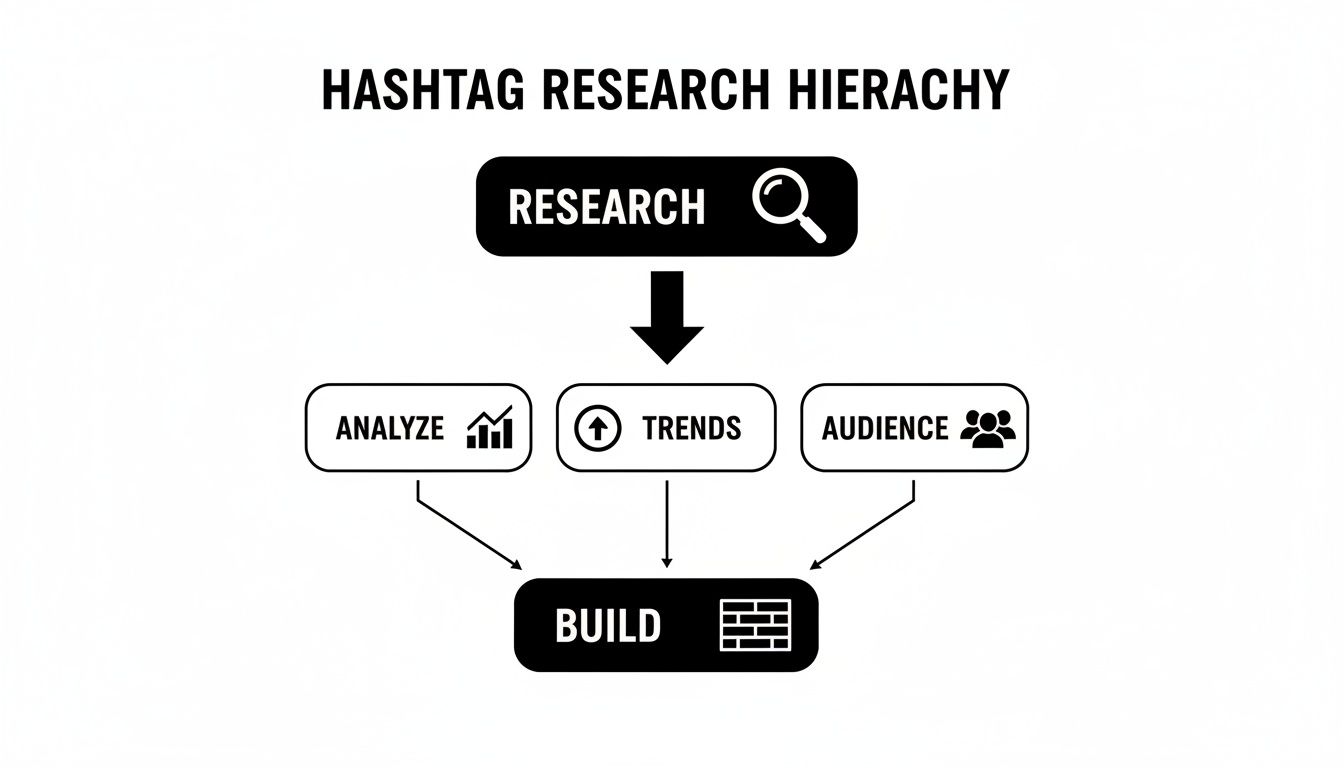
This visual really drives home that building your hashtag sets is the final piece of the puzzle. It only works after you’ve done the heavy lifting of research and analysis to figure out what your audience actually cares about.
Laying the Foundation: Niche and Hyper-Specific Tags
The base of your pyramid is the largest and most critical part. These are your niche, low-competition hashtags that are directly related to what’s in your post.
Think things like #handmadepotterymugs instead of #pottery, or #austincoffeeculture instead of #coffee. The competition is way lower, which means your post stays visible in that tag’s feed for longer. More importantly, you're connecting with a super-targeted audience that’s actively looking for what you offer.
Building the Middle: Community and Interest Tags
The next layer up is all about tapping into existing communities. These hashtags aren’t necessarily about your product, but about the people you want to attract.
Tags like #creativelifehappylife or #womeninbusiness connect you with people who share certain values, interests, or identities. It’s less about making a direct sale and more about finding your tribe and joining a larger conversation.
Reaching the Peak: Broad and Popular Tags
Right at the top of the pyramid, you’ll have just a couple of broad, high-volume tags. Use these sparingly.
A massive tag like #digitalmarketing has millions of posts. Using it might give you a tiny, short-lived burst of visibility to a huge audience, but your content will be pushed down the feed in a matter of seconds. I’d recommend using only one or two of these per post, if any.
Key Takeaway: The goal isn’t just to use more hashtags; it's to use smarter ones. A balanced mix ensures you're connecting deeply with a smaller group of potential customers who are far more likely to engage, not just aiming for vanity metrics.
To give you a clearer picture, here’s a quick breakdown of how these different hashtag types function.
Hashtag Type and Purpose
| Hashtag Type | Typical Post Volume | Strategic Purpose | Example |
|---|---|---|---|
| Niche/Specific | Under 50k | Connects with high-intent users, less competition. | #seattlefoodblogger |
| Community | 50k – 500k | Joins a conversation, builds brand affinity. | #makersgonnamake |
| Broad/Popular | 500k+ | Provides a short-term burst of wide visibility. | #entrepreneurship |
| Branded | Varies | Tracks user-generated content and brand mentions. | #YourBrandHere |
By pulling a few tags from each of these categories, you create a well-rounded portfolio that gives every single post its best chance to succeed on multiple fronts.
The ideal number of hashtags also seems to depend on your account size. While Instagram sometimes suggests using just a few, recent data paints a different picture, especially for smaller accounts. According to a study highlighted by Search Logistics, profiles with under 1,000 followers that used 11 or more hashtags saw their engagement increase by a whopping 79.5%.
This suggests that if you're just starting out, using a larger, well-curated set of hashtags is absolutely essential for getting that initial traction.
Where to Put Your Hashtags (And How to Format Them)
Alright, you've put in the work and have a solid mix of hashtags ready to go. Now for the million-dollar question: where do you actually put them? How you place and format your hashtags is just as important as which ones you choose, impacting everything from how the algorithm sees your post to how your audience perceives your brand.
The oldest debate in the Instagram playbook is caption vs. first comment. For years, everyone swore by hiding hashtags in the first comment to keep the caption looking clean. While Instagram has officially said that hashtags work just fine in either spot for discoverability, there are still a few practical differences to think about.
Putting hashtags right in the caption means they start working the second your post is published. It’s the most straightforward and reliable method, especially if you’re scheduling content. On the flip side, moving them to the first comment cleans up your caption and puts the focus squarely on your message. If you go this route, you have to be quick—that comment needs to go up immediately after your post does.
Keep Your Captions Clean and Readable
No matter where you place them, you have to avoid the dreaded "wall of hashtags." Nothing screams "spammy" faster than a giant, unformatted block of tags tacked onto a post. It's distracting and can cheapen your message.
A super simple trick is to create some visual space. After you write your main caption and call to action, add a few line breaks. You can use a single period, a dash, or even a subtle emoji on each line to push the hashtag block down. This tucks them neatly below the "read more" fold, giving you a clean aesthetic without hurting your reach. If you want a full walkthrough, here’s a great guide on how to create line breaks in your Instagram caption.
Common Hashtag Mistakes to Steer Clear Of
Knowing how to use hashtags also means knowing what not to do. A few common slip-ups can tank your reach or even get your content flagged by the algorithm.
Key takeaway: The goal is always relevance, not repetition. Pasting the exact same block of 30 hashtags on every single post is a huge red flag for Instagram. It looks like spam, and the algorithm can penalize your reach for it over time.
To keep your content in the algorithm's good graces, make these practices a habit:
- Rotate Your Hashtag Groups: Don't rely on one master list. Create a few different, pre-saved hashtag sets based on your main content pillars. Cycle through them and tweak them for each individual post to keep things fresh.
- Check for Banned Hashtags: Every once in a while, a totally innocent hashtag gets hijacked and temporarily banned or restricted by Instagram. It's easy to check—just search for the tag on the Explore page. If you get a message saying recent posts are hidden, drop that tag from your list immediately.
- Don't Hashtag Every Other Word: Sprinkling hashtags directly into your sentences (#this #is #what #I #mean) is a very outdated look. It makes your caption a mess to read and just doesn't work as well. Keep your block of hashtags separate and below your main message.
Putting Your Hashtag Strategy on Autopilot for Evergreen Posts
Let's be honest. Manually researching and adding the perfect hashtag mix to every single post is a huge time-suck. For busy social media managers or small business owners, it’s one of those tasks that can easily swallow hours each week. This is where automation isn’t just a nice-to-have; it's your secret weapon for getting that time back without sacrificing reach.
When you automate your evergreen content—those powerhouse posts that stay relevant for months or even years—you're building a system that works for you in the background. Tools like EvergreenFeed were built for exactly this, helping you create a sustainable, hands-off content pipeline.
Start by Organizing Your Content into "Buckets"
The first move in creating a smarter workflow is to sort your best content into what we'll call 'buckets.' Think of them as the main categories or themes that define your content strategy. Getting this organizational step right is the foundation for scaling your Instagram hashtag game.
A digital marketing agency, for example, might set up buckets like these:
- Blog Posts & Case Studies: Perfect for driving traffic and showing off impressive results.
- Client Testimonials: The go-to bucket for building trust and social proof.
- Quick Marketing Tips: Great for providing value and getting those coveted post saves.
- Promotional Content: For when you need to announce a new service or a special offer.
This screenshot from EvergreenFeed gives you a clear picture of how you can organize these different content types visually.
By assigning each post to a specific bucket, you create a neat and tidy content library. This makes it incredibly easy to manage your posts and maintain a balanced mix of topics on your feed. You can dive deeper into different methods for automating your Instagram posts.
Pair Your Content with Smart Hashtag Groups
Once you have your buckets organized, the real magic begins. You'll create a corresponding hashtag group for each content bucket.
So, your "Client Testimonials" bucket would be paired with a hashtag group all about social proof, industry trust, and your own branded tags. In contrast, your "Quick Marketing Tips" bucket gets a set of hashtags focused on education and community engagement.
By linking specific hashtag sets to content categories, you ensure every post goes out with a perfectly tailored, highly relevant group of tags—no manual copy-pasting required. This guarantees maximum relevance and reach every single time.
This simple setup creates a powerful, automated loop. A tool like EvergreenFeed can connect directly to your scheduler (like Buffer), pull a post from one of your buckets, and automatically pair it with one of your pre-made hashtag groups. Then, it just publishes at the time you’ve set.
For anyone serious about scaling their efforts, looking into AI social media marketing strategies can completely change how you work. Automation is often the first step toward building a smarter, more efficient marketing machine.
With this system, your best content is constantly being shared with fresh, effective hashtags, keeping your profile active and engaging without you having to lift a finger. It's the ultimate "set it and forget it" approach for your evergreen Instagram posts.
Common Instagram Hashtag Questions, Answered
Okay, so you've got the theory down, but when you actually start using hashtags, the real questions pop up. It's one thing to know you should use them, and another to feel confident you're doing it right. Let's clear up some of the most common sticking points I see people struggle with.
How Many Hashtags Should I Actually Use?
This is a big one. You can use up to 30, but should you? The answer isn't so simple.
Instagram itself often suggests a minimalist approach, recommending just 3-5 super-relevant tags. For huge accounts with massive built-in engagement, this works just fine—the algorithm already knows who to show their content to.
But for the rest of us? The data tells a different story. Many studies have shown that using more hashtags—often in the 9-11 range—can give your reach a serious boost, especially if you're working with under 10,000 followers.
My advice? Start by testing a healthy mix of 5-15 relevant tags per post. Then, keep a close eye on your Instagram Insights. See which posts take off and which fall flat, and let that data guide your sweet spot.
Caption or First Comment: Where Do Hashtags Go?
Ah, the great debate. The truth is, Instagram's algorithm doesn't care. For discoverability, a hashtag in the caption is treated the same as one in the first comment. So, this decision really comes down to your personal preference and workflow.
Tucking them away in the first comment gives your caption a much cleaner, uncluttered look. It lets your message shine without a block of blue text at the end. If you go this route, you have to be fast. The comment needs to be posted immediately after your content goes live, or the algorithm might miss its chance to index your post properly.
On the other hand, putting them right in the caption is just plain easier, especially if you're using a scheduler like EvergreenFeed. It's the most reliable way to guarantee your hashtags are working for you from the very first second.
Is It Bad to Use the Same Hashtags Over and Over?
Yes, absolutely. Slapping the same block of 30 hashtags on every single post is a huge red flag for Instagram. It looks spammy, signals low effort, and can eventually get your content deprioritized by the algorithm. Don't do it.
Your hashtags should always be tailored to what's actually in the photo or video. To make this manageable without starting from scratch every time, try this:
- Build Hashtag Groups: Create a few different lists based on your main content themes. Think "Educational Tips," "Behind the Scenes," or "Product Features."
- Rotate Your Lists: Don't just use the "Educational Tips" list for every tip. Cycle through your different groups to keep things fresh.
- Customize Every Time: Before you post, take 30 seconds to review your chosen hashtag list. Swap out a couple of generic ones for a few that are hyper-specific to that particular post.
How Do I Know If a Hashtag Is Banned?
Using a "broken" or banned hashtag is like a silent killer for your reach. Instagram restricts tags that have been overrun with inappropriate content, and if you use one, your post won't show up on that tag page or be distributed to new audiences.
Luckily, checking is easy. Just search for the hashtag on Instagram. If you tap on it and see a message saying recent posts are hidden, that tag is banned. Get it out of your lists immediately. It's smart to do a quick audit of your go-to hashtags every few months to make sure none have been flagged.
Ready to automate your evergreen content and nail your hashtag strategy without the manual work? EvergreenFeed helps you create content buckets and pair them with smart hashtag groups, so your best posts are always resurfacing at the perfect time. Sign up for free and start saving hours.