James
James
So, what does it actually mean to "bump" a post on Facebook? At its core, it's the simple act of reviving an older piece of content by creating a new interaction. This action signals to the algorithm that the post is still relevant, pushing it back to the top of feeds and timelines.
In a Facebook Group, this is often as simple as adding a comment. For a business Page, however, it usually involves more strategic methods like resharing the post or putting a little money behind it with a paid boost to recapture attention.
What Bumping a Facebook Post Actually Means
We’ve all been there. You craft a fantastic Facebook post, it gets some great initial traction, and then… crickets. Within a day or two, it’s vanished into the depths of the news feed, buried under a mountain of newer content. It's a common frustration, but bumping is the answer.
Think of it as refusing to let your best work fade away. Instead of accepting that a high-performing post has run its course, bumping brings it back into the spotlight for a second chance to shine. It’s a crucial tactic for fighting the natural drop-off in organic reach that every single page and profile deals with.
The Core Purpose of Bumping
The main goal here is to kickstart the engagement cycle all over again. Every new comment or share tells Facebook's algorithm, "Hey, people still care about this!" In turn, the algorithm is more likely to show it to a new wave of people.
This simple act can unlock some powerful benefits:
- More Eyeballs: It gets your post back to the top of the feed, reaching people who missed it the first time around.
- Fresh Engagement: A well-timed bump can spark new conversations, attracting a fresh round of likes, comments, and shares.
- Longer Shelf Life: You get more mileage out of your best content, ensuring it continues to deliver value long after you first hit "Publish."
Bumping isn’t about being spammy. It’s a smart, strategic way to recirculate your most effective content. When you know when and how to do it right, you can massively amplify your impact without being stuck on the content creation treadmill.
To help you decide which path to take, here's a quick look at the different bumping methods available.
Facebook Bumping Methods at a Glance
This table breaks down your options based on where you're posting and what you're trying to achieve.
| Context | Bumping Method | Primary Goal | Best For |
|---|---|---|---|
| Facebook Groups | Commenting "Bump" or "." | Instant visibility in feed | Getting quick answers, selling items, or reminding members about an event. |
| Personal Profile | Sharing the original post | Reach a wider personal network | Highlighting personal achievements, resharing memories, or important announcements. |
| Business Page (Organic) | Resharing with new context | Re-engage existing followers | Evergreen content, popular blog posts, or past promotions that are still relevant. |
| Business Page (Paid) | Boosting the post | Targeted reach to a new audience | High-performing posts, lead generation, or driving traffic to a specific offer. |
Choosing the right approach is key. A simple comment works wonders in a group, but a paid boost is what you need to reach a specific new audience from your business page.
This decision tree gives you a simple visual guide for bumping a post, depending on the context.
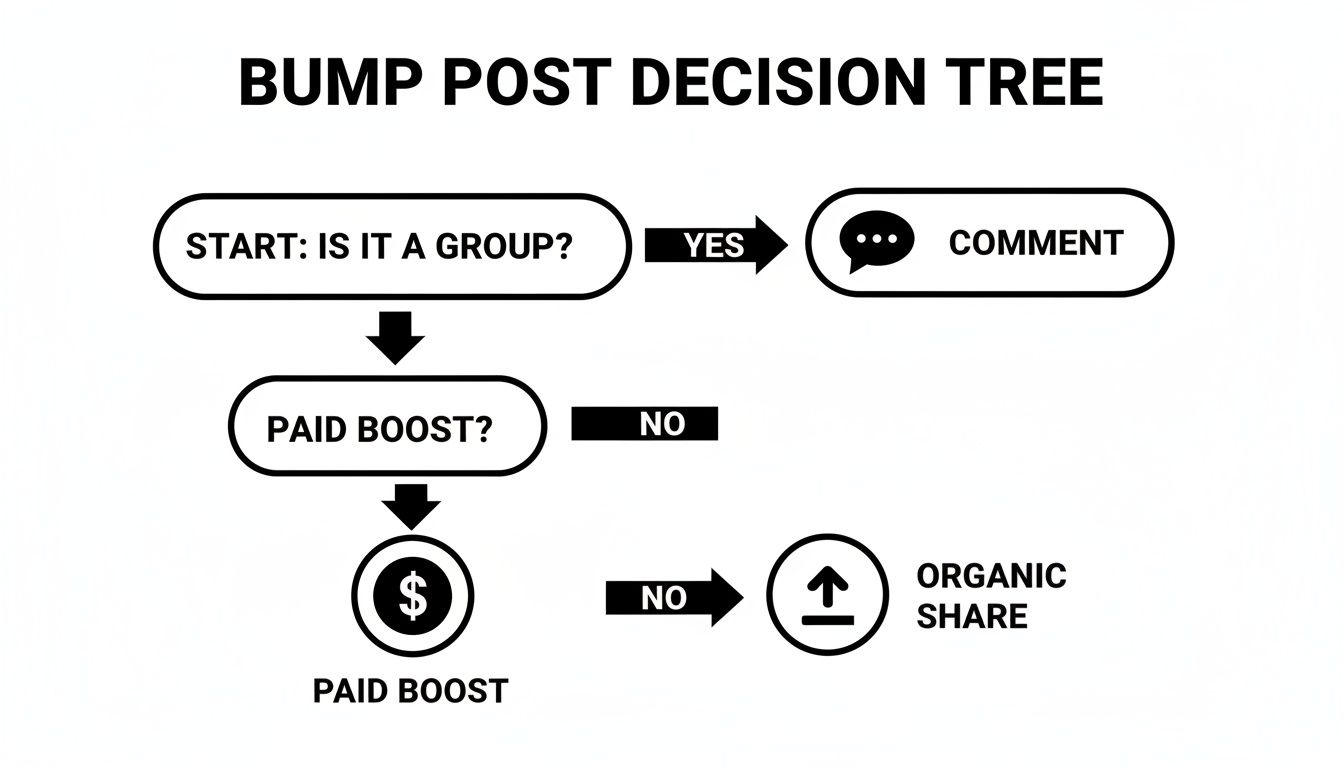
As you can see, the right method really depends on whether you're engaging in a community discussion or trying to get more traction for your own page.
Organic Ways to Bump Posts Without Spending a Dime
You don't always need to open your wallet to get more eyes on your content. With a bit of know-how, you can organically "bump" your posts, giving them a second life without spending a cent. The secret is knowing the right approach for different parts of the Facebook ecosystem.
Bumping Posts in Facebook Groups
In Facebook Groups, the goal is to reignite a conversation. Sure, you can technically comment "bump" or just a single period "." to push a post to the top, but let's be honest—it's lazy. It often looks spammy and can even get you in trouble with group admins.
A much smarter way is to add a genuinely new and insightful comment.
Let's say a month ago you asked a group for local marketing ideas. Instead of a generic bump, you could go back and add, "Quick update for everyone who helped: I took the advice on local SEO and saw a 15% bump in foot traffic! Has anyone else tried this recently?" See the difference? You've not only bumped the post but added real value and sparked fresh conversation.
Reviving Content on Your Business Page
Bumping a post on your own Business Page is a different game since you can't just comment to push it up your own timeline. The most effective strategy here is to reshare your greatest hits—those high-performing posts from the past—but with a fresh spin.
Think about a killer blog post you shared last year. Don't just hit the share button. Reframe it. Maybe you can tie it to a current event, a new company milestone, or a recent customer win.
For example, a local bakery could find its most popular "best seller" post from six months ago. They could then reshare it with a brand-new photo of a customer enjoying that exact pastry, adding a caption about how it's still the reigning fan favorite. This feels new and authentic, not like a stale repeat.
Here are a few more battle-tested ideas for your page:
- Tag a Partner: Go back to a post that featured a collaborator or influencer. Add a new comment tagging them and ask a follow-up question.
- Run a "From the Archives" Series: Make it a regular feature. Once a week, reshare a top post from your history with some new commentary on why it's still relevant.
- Pose a New Question: Simply edit the original caption. Add a new, thought-provoking question at the top to get your current audience talking.
By focusing on adding new value, every bump becomes a meaningful touchpoint instead of just noise. If you want to dig deeper into this, check out our guide on how to increase your Facebook organic reach.
Using Paid Boosts to Amplify Your Best Content

Sometimes, even your best organic efforts need a little push to get over the finish line. That’s where paid boosts come in. Think of it as adding fuel to a fire that’s already burning brightly, guaranteeing your top-performing content gets in front of a much wider, targeted audience.
The trick is knowing which posts are worth your ad dollars. Don't just throw money at every post hoping something sticks. Instead, look for your organic winners—the posts that are already getting an unusual amount of love through shares, comments, and reactions. Boosting this proven content is a much smarter investment.
Setting Up Your First Boost
Ready to give it a try? Facebook makes it pretty easy to get started with the "Boost Post" button. You'll first define what you want to achieve, whether it’s more engagement on the post itself or driving people to your website.
Then, you get to play matchmaker and build your ideal audience. You can get surprisingly specific with demographics, interests, behaviors, and location. For instance, a local coffee shop could target people within a 5-mile radius who’ve shown an interest in things like "espresso" and "local markets." It’s that granular.
A classic rookie mistake is casting the net too wide. Start with a tightly focused niche audience and a small budget—even $5-$10 per day is enough to gather data. Once you see what’s working, you can scale up.
To really get the most bang for your buck, it helps to stay current on Facebook Ads best practices. This will help you avoid common pitfalls and make every dollar count.
Of course, spending money is only half the battle. You need to know if it's actually working. For a deeper dive into tracking your success, check out our guide on https://www.evergreenfeed.com/blog/how-to-measure-social-media-roi/.
Automating Your Bumping Strategy for Consistent Results

Manually bumping posts works, there’s no doubt about it. But let's be honest—it’s a huge time sink. This is where automation really shines, turning a repetitive daily chore into a hands-off system that keeps your best content from getting buried.
The whole idea is to build a library of your evergreen content and let a dedicated tool handle the resharing for you. This approach gives your most valuable posts a much longer lifespan and keeps your feed active, which is a great signal to the Facebook algorithm.
Building Your Evergreen Content Machine
Think of this as setting up your own content recycling system. The first thing you need to do is organize your posts into different categories, or "buckets." This lets you create a balanced posting schedule without thinking about it.
For instance, you could create buckets for:
- Blog Posts: Your deep-dive articles that bring in traffic.
- Quick Tips: Those shareable graphics and short, punchy pieces of advice.
- Case Studies: Posts that prove you get results and build trust.
- Promotional Content: All your offers, discounts, and lead magnets.
With these buckets in place, you can build a smart schedule that pulls from them automatically. Maybe you set it to share a "Blog Post" every Monday morning and a "Quick Tip" every Wednesday afternoon. This gives your audience a nice variety and keeps them from getting bored. Many social media management apps are built specifically for this kind of scheduling.
The real magic here is consistency. A steady stream of high-value content signals to the Facebook algorithm that your page is active and relevant, which can lead to impressive, sustained growth over time.
Why Automation Is a Game Changer
Remember back in 2018 when Facebook’s algorithm changed and organic reach plummeted? Pages saw their reach drop by an average of 50-60%, and suddenly, marketers had to get a lot smarter about visibility. This is when bumping evergreen content became a go-to tactic.
Automating this process is simply the next logical step. It saves you hours of manual work and maintains a baseline of activity that the algorithm tends to reward.
When you're trying to figure out how do you bump a post on facebook, letting a tool handle the repetitive heavy lifting is almost always the smartest move. It frees you up to focus on creating great new content while your proven winners are automatically put back into circulation. You can dig deeper into this strategy by reading about automating Facebook sharing.
Best Practices and Common Bumping Mistakes to Avoid

Knowing how to bump a post is one thing, but doing it right requires a bit of finesse. You can't just spam "bump" in a group or endlessly reshare old content. That’s a fast track to annoying your followers and getting flagged by group admins.
The best bumps always add value. Before you even think about reviving a post, ask yourself: is this still relevant? Is it high-quality? If a post was a dud the first time, bumping it won't magically make it a winner. Stick to reviving the proven performers—the content your audience already loved.
Essential Rules for Smart Bumping
Following a few simple guidelines can make sure your bumping strategy helps, not hurts. The golden rule is to always respect the community you're a part of.
- Check Group Rules: This one’s huge. Many Facebook Groups have specific policies against bumping posts. Breaking those rules can get your post deleted or, even worse, get you kicked out of the group. Always check first.
- Add Fresh Context: Don't just hit "share" on your own page. Give it a new spin. Add a new caption, pose a different question, or link the old content to something happening right now.
- Don't Over-Automate: Tools like EvergreenFeed are fantastic for consistency, but a feed that’s 100% automated feels robotic. You need to mix in spontaneous, authentic posts to keep that human connection alive.
The goal is to re-engage, not just recirculate. A great bump feels like a timely reminder or a valuable follow-up, not a lazy repeat.
Common Pitfalls You Need to Sidestep
Understanding how do you bump a post on Facebook also means knowing what not to do. Steer clear of these common missteps to keep your audience happy and your page healthy.
The biggest mistake I see is people bumping content that isn't sharable in the first place. The Facebook algorithm rewards shares above almost anything else. Bumping is way more effective when you're re-upping your most shareable content at peak times.
In fact, pages that strategically bump their best content 3-5 times a week can see 12% more reach on each of those posts. You can find more details on how the Facebook algorithm works over at Wordstream.com.
Your Top Questions About Bumping Facebook Posts, Answered
Once you start thinking about bumping posts, a few practical questions always pop up. Let's clear the air on some of the most common ones so you can get back to boosting your content the right way.
How Often Can I Actually Bump a Post?
There’s no magic formula, but a good rule of thumb for your own Page is to wait at least a few weeks before resharing evergreen content. This keeps your feed from feeling repetitive and annoying your followers.
In Facebook Groups, things are different. Tread carefully and limit bumps to once every 24-48 hours, but only if the group rules even allow it. The golden rule is to check the engagement—if a post is still getting organic traction, let it ride before jumping in with a bump.
Can Bumping Get Me Kicked Out of a Group?
Yes, absolutely. This is probably the biggest risk. Group admins are constantly on the lookout for spammy behavior, and just typing "bump" or a single period is a classic red flag that can get you muted or even removed.
Always, always read the group rules before you do anything.
Pro Tip: The best way to bump a post in a group without breaking the rules is to add genuine value. Post a follow-up question, share a related insight, or reply to a new comment. This revives the discussion naturally.
What's the Real Difference Between a "Bump" and a "Repost"?
Good question. While they both aim to breathe new life into old content, they work a bit differently.
Bumping is all about reviving a post in its original spot. Think of it as pushing a conversation back to the top of the feed, usually by adding a new comment. This is most common in groups.
Reposting (or resharing) means creating a brand-new post on your own Page that duplicates or links back to the original content. You'd typically write a fresh caption or add a new angle. Given that organic engagement on Facebook hovers around a tiny 3.91%, reposting is a critical strategy for getting more eyes on your best stuff. For a deeper dive, check out these eye-opening Facebook statistics on Recurpost.com.
Tired of manually bumping and reposting? You can automate your best content. EvergreenFeed works with Buffer to create a scheduling powerhouse that keeps your feed active with proven content, saving you a ton of time. Start your free trial and let your content work for you.