James
James
If you've ever Googled "good time to post on Instagram," you’ve probably seen a dozen articles giving you the same generic advice. Weekday afternoons and evenings, right? While those windows can be a decent starting point, they're far from a magic bullet. The reality is, your perfect posting time is as unique as your brand.
Why Generic Best Posting Times Don't Work
Relying on broad, industry-wide averages for your Instagram strategy is like trying to navigate a new city with a map of the entire country. It’s just not specific enough to get you where you need to go.

The idea that there's a single "best" time to post is a complete myth. What works wonders for a fast-fashion brand targeting Gen Z in North America will almost certainly flop for a B2B SaaS company trying to reach CTOs in Europe. A one-size-fits-all approach ignores the very factors that make your audience unique, and it’s a surefire way to leave engagement on the table.
Your Audience Is Not a Monolith
The number one reason generic advice fails is simple: your followers don't all live the same life. Their daily routines, jobs, and habits directly influence when they pick up their phones to scroll.
You have to dig into the specifics of your community:
- Time Zones: This is the most obvious one. If you have followers in New York, London, and Sydney, a 3 PM EST post is great for New Yorkers, but it's 8 PM for Londoners and a sleepy 5 AM for your audience in Sydney.
- Occupations and Lifestyles: Think about it. A personal trainer’s audience is probably most active around 6 AM before heading to work or during their lunch break. On the other hand, a food blogger might see a huge spike around 5 PM when people are looking for dinner inspiration.
- Age Demographics: A brand targeting college students will likely see peaks late at night and on weekends. An account followed by working parents? Their sweet spot is probably the early morning before the school run or in the evening after the kids are in bed.
For example, a boutique coffee shop in Seattle might discover its highest engagement happens at 7:30 AM PST as locals grab their morning brew. Meanwhile, a global crypto news account could find its prime time is 7 AM GMT when European markets open and traders are hungry for updates.
Key Takeaway: Stop asking, "What's the best time to post on Instagram?" and start asking, "When is my audience actually online and ready to engage?"
The Instagram Algorithm Rewards Timeliness
It’s not just about catching your audience when they're available; it’s also about playing nice with the Instagram algorithm. The algorithm is designed to show users the freshest, most interesting content first.
When you post at a time your followers are actively scrolling, you get an immediate burst of engagement—likes, comments, saves, and shares right out of the gate. This initial traction is a powerful signal to the algorithm that your content is high-quality. That can create a snowball effect, getting your post shown to even more of your followers and potentially landing it on the Explore page.
Now, imagine posting at 3 AM when most of your audience is fast asleep. By the time they wake up and open the app, your post is already hours old. It's buried under a mountain of newer content from other accounts, and its chance for that critical initial momentum is gone.
This is precisely why a smart, data-backed posting schedule is so crucial. It's not about gaming the system; it's about aligning your content with the natural rhythm of your specific community.
Using Industry Benchmarks as Your Starting Point
So, where do you even begin? While your own audience data is the ultimate goal, you don’t have to start by throwing content at the wall to see what sticks. Think of industry-wide data as your strategic launchpad—a set of well-researched coordinates to guide your first few experiments.
This approach takes you from pure guesswork to forming an educated hypothesis. These benchmarks come from analyzing millions of posts, so they reveal real, predictable patterns in user behavior. Most peak times align with obvious moments in the day: the morning commute, the midday lunch break, and the evening wind-down. Understanding the "why" behind these general trends helps you make smarter choices right out of the gate.
What the General Data Tells Us
Broadly speaking, weekdays are prime time for engagement on Instagram. You'll often see a powerful window open up mid-afternoon, around 3 PM to 6 PM. This makes perfect sense—the workday is winding down, and people are reaching for their phones for a mental break or to plan their evening.
The classic lunch hour, from about 12 PM to 2 PM, is another reliable bet. It's a natural break in the day when users are catching up on their feeds. These windows aren't magic; they're just logical points where you have a high probability of reaching people who follow a traditional work schedule.
One of the more surprising findings from large-scale research is how effective the early morning can be. An analysis of over 6 million Instagram posts revealed that the single best time to post, on average, is 5 AM. Posting anywhere between 3 AM and 6 AM daily often leads to higher engagement because you catch people during their very first scroll of the day, with far less competition in the feed. You can dive deeper into the data in Later's 2025 posting time analysis.
Getting More Specific: A Look at Different Industries
General data is a great starting point, but drilling down into your specific industry adds another layer of precision. Different sectors serve audiences with wildly different daily routines, and their peak Instagram times reflect that.
For example, a B2C retail brand might crush it with evening and weekend posts. That’s when their audience is in a more leisurely, inspirational mindset, browsing for their next purchase. On the flip side, a B2B marketing agency will likely find its sweet spot during weekday business hours, when its professional audience is actively looking for work-related solutions.
Here’s how this plays out in a few different fields:
- Dining and Hospitality: Unsurprisingly, engagement often spikes around mealtimes. Think 11 AM to 3 PM on weekdays, when people are looking for lunch spots or making dinner plans.
- Media and Entertainment: Activity here lines up with people's downtime. That means morning commutes (7 AM to 8 AM), the post-work scroll (5 PM), and lazy Sunday afternoons (1 PM) are often golden.
- Healthcare and Wellness: These brands tend to connect with their audience during morning routines (8 AM to 11 AM on Saturdays) and midday breaks when self-care is top of mind.
General Instagram Posting Times Cheat Sheet
To give you a practical foundation for your first experiments, I've put together a cheat sheet with some widely accepted posting windows. Remember, treat these as your initial hypothesis—a place to start testing, not a permanent solution. All times are based on your audience's primary local time zone.
| Day of the Week | Generally Recommended Time Windows (Local Time) | Why It Works |
|---|---|---|
| Monday | 3 PM – 6 PM | Users are easing back into the week and catching up on social media after work. |
| Tuesday | 11 AM – 2 PM & 5 PM – 7 PM | Captures both the lunchtime crowd and the post-work scrollers. |
| Wednesday | 3 PM – 5 PM | Midweek engagement often peaks as users look for a break from their routine. |
| Thursday | 4 PM – 6 PM | People start planning for the weekend, looking for inspiration and ideas. |
| Friday | 11 AM – 2 PM & 4 PM – 5 PM | High engagement as the workweek wraps up and weekend excitement builds. |
| Saturday | 11 AM & 5 PM – 6 PM | Catches users during their leisurely morning scroll and evening downtime. |
| Sunday | 12 PM – 3 PM | A relaxed, midday window when people are winding down and prepping for the week. |
Using this table, you can select a few promising time slots to begin your tests. For instance, a lifestyle brand might test a 5 PM post on Thursday against an 11 AM post on Saturday. This structured approach ensures you’re making data-informed decisions from day one, setting the stage for a truly optimized posting schedule.
Finding Your Peak Times in Instagram Insights
While industry benchmarks give you a great starting point, your own Instagram Insights is where you stop guessing and start knowing. Think of it as your personal treasure map. This built-in tool gives you a direct, unfiltered look at when your followers are online and ready to engage. This is how you pivot from a generic strategy to a truly personal one that gets results.
First things first, you’ll need a Business or Creator account to get this data. Once you have that, finding your audience analytics is a breeze. This is the key to unlocking the best time to post on Instagram for your unique community, moving beyond averages to what actually works for you.
How to Read Your Audience Activity Chart
Head over to your Professional Dashboard and find the 'Audience' or 'Total Followers' tab. Scroll down a bit, and you'll see a section called 'Most Active Times.' This is your new command center for scheduling.
You’ll find the data presented in two ways: by hours and by days. The hourly chart is the most useful at a glance. It uses a series of blue bars to show how many of your followers are online at any given time. Taller bars mean more people are scrolling—a crystal-clear visual of your peak engagement windows.
Here’s a look at what the 'Most Active Times' chart looks like right in the app.
This chart tells a quick story. For this account, activity clearly spikes around 6 PM, making that a fantastic time to test a post.
Translating Data into a Posting Schedule
Looking at the chart is one thing; turning those blue bars into an actual schedule is the real work. The trick is to avoid just picking the single tallest bar and calling it a day. Instead, look for the 2-3 hour windows where activity is consistently high.
For example, if you see sustained activity from 4 PM to 7 PM on weekdays, you've got a solid three-hour block to play with. A great starting point would be to post right in the middle, maybe at 5:30 PM, to catch that building momentum.
Also, make sure you toggle between the 'Hours' and 'Days' views. You might discover that while your weekday audience peaks in the evening, your Saturday crowd is most active around noon. This kind of insight helps you build a flexible schedule that adapts to how people actually use Instagram throughout the week.
Pro Tip: Don't forget about the "shoulders" of your peak times. If your absolute peak is at 6 PM, posting at 5 PM can be incredibly effective. It gives the algorithm a little time to start showing your content to people, so it's already circulating when the biggest wave of users logs on.
Common Mistakes to Avoid
Your Insights data is powerful, but it's easy to misinterpret. I've seen plenty of people fall into a few common traps that lead to the wrong conclusions.
Try to sidestep these pitfalls to make sure your strategy is built on solid ground:
- Only Checking One Day: Never, ever base your entire schedule on a single day’s data. User behavior on a Tuesday afternoon is worlds apart from a Sunday morning. Check each day.
- Ignoring Follower Growth: As your account gets bigger, your audience demographics can change. I always recommend a quarterly check-in on your Insights to ensure your schedule is evolving right along with your community.
- Forgetting About Time Zones: If your 'Top Locations' show followers scattered across different time zones, a one-size-fits-all approach won't work. A 6 PM post for your New York audience is a 3 PM post for followers in Los Angeles.
Juggling all this data can feel like a lot, which is why using a dedicated social media analytics report template is a lifesaver for organizing your findings and spotting trends over time.
While your own data is king, it's always smart to see how it lines up with broader trends. Recent data, for instance, points to Tuesdays through Thursdays as strong days for engagement, with a wide peak from 11 a.m. to 6 p.m. This window captures everything from late morning coffee breaks to the post-work scroll. Another study of 2 million posts found that 3 p.m. and 6 p.m. on weekdays were powerhouse times for reach. Cross-referencing these benchmarks with your specific Insights is how you build a truly robust, evidence-based posting strategy.
How to Run Simple Posting Time Experiments
Your Instagram Insights have given you a solid hypothesis—a set of peak times when your audience should be most active. Now it's time to put that theory to the test. Running a few simple A/B tests is how you'll confirm those hunches and lock down the posting times that actually drive results for your account.
Don't worry, you don't need a data science degree for this. It's all about being methodical, consistent, and a little patient while you gather real-world performance data. The goal is simple: pit different time slots against each other and see which one consistently brings in more engagement.
A great way to start is by testing your current go-to posting time against one of the peak hours you just uncovered in your Insights.
- Test Group A: Your current, established posting time (say, 4 PM on weekdays).
- Test Group B: A new, data-backed time from your Insights (like 6 PM on weekdays).
This little flowchart breaks down exactly where to find those potential test times right inside the Instagram app.
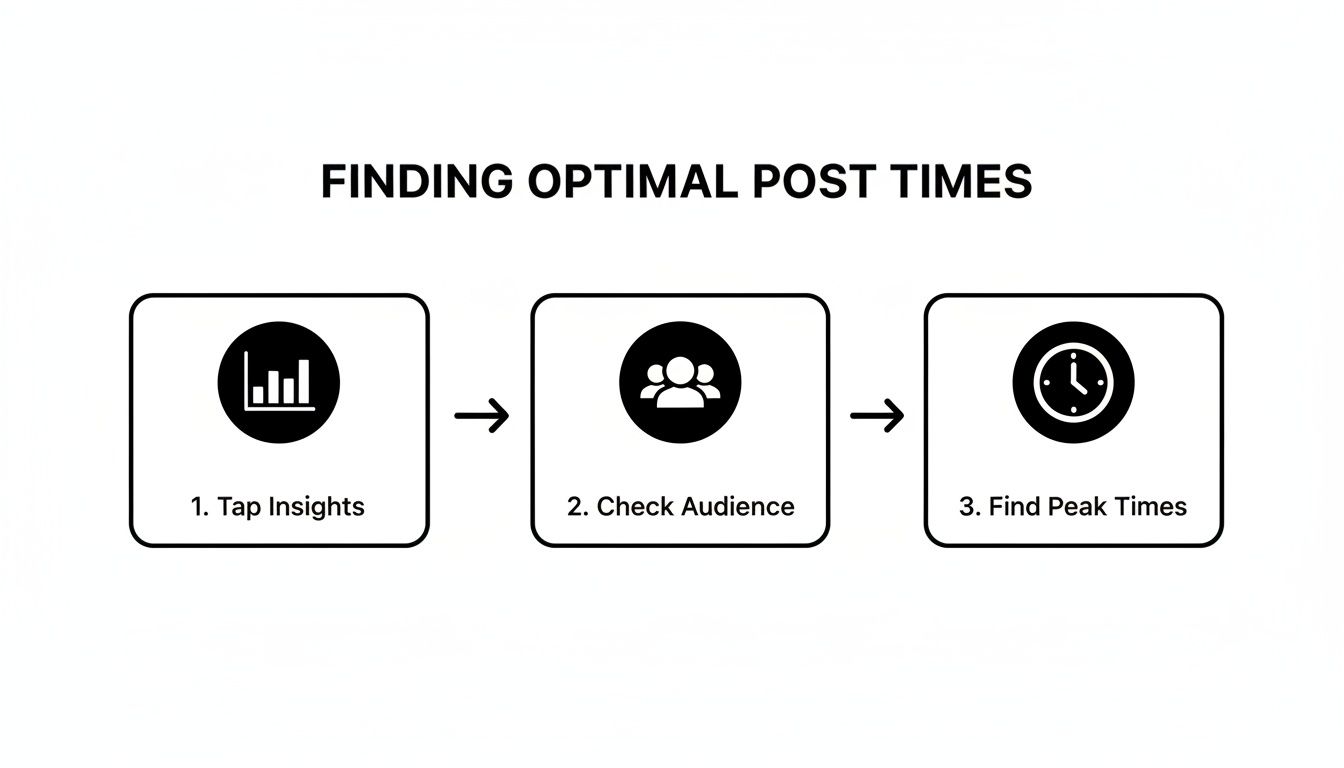
It’s a simple path: from the main Insights dashboard, you dive into your audience data to pinpoint the exact hours your followers are most active. Those are your prime candidates for testing.
Designing a Fair Test
Here’s the most important part of this whole experiment: consistency. If you post a killer, high-energy Reel at one time and a basic text graphic at another, you're not really testing the time—you're testing the content. To get clean, reliable results, you have to keep the type of content as similar as possible.
So, if you’re testing Tuesdays versus Thursdays for a couple of weeks, try posting similar content formats on those days. If Tuesday gets a carousel post, Thursday should too. This helps ensure that any big swings in performance are actually because of the timing, not just because one piece of content was a dud.
Key Insight: A good experiment isolates one variable. For us, the only thing that should change between your test posts is the time they go live. Everything else—the format, topic, and tone—needs to stay the same.
While we're focused on Instagram here, the core ideas of testing and measuring apply everywhere. For more inspiration on how to structure your tests, these data-backed tips to find the best time to post on Twitter are super helpful, as the fundamental principles are universal.
Tracking Your Results for Clear Answers
You don't need fancy software to track your results. A simple spreadsheet is your best friend here. The idea is to create an organized log of your posts and their initial performance metrics. Give it about two to four weeks, and you’ll have enough data to see clear patterns emerge.
You can grab a pre-made tracker from our guide on building a https://www.evergreenfeed.com/blog/social-media-posting-schedule-template/ or just build your own.
Here’s a quick template to show you what I mean. It’s a straightforward way to organize your experiment and see the numbers side-by-side.
A/B Testing Schedule and Metrics Tracker Template
| Post Date | Test Time Slot | Content Type | Reach | Likes | Comments | Shares | Saves |
|---|---|---|---|---|---|---|---|
| Oct 14 | 4:00 PM (A) | Carousel | 4,250 | 310 | 25 | 12 | 45 |
| Oct 16 | 6:00 PM (B) | Carousel | 5,100 | 450 | 40 | 21 | 72 |
| Oct 21 | 4:00 PM (A) | Carousel | 4,500 | 330 | 28 | 15 | 50 |
| Oct 23 | 6:00 PM (B) | Carousel | 5,500 | 490 | 48 | 25 | 85 |
After tracking for a few weeks, the winning time will become obvious. In this example, you can see that posts published at 6 PM consistently earned 20-25% more reach and significantly more saves. That’s the hard data you need to confidently shift your entire posting schedule.
This simple process moves your strategy from guesswork to one grounded in solid evidence.
Automating Your Schedule for Consistent Results
So, you’ve put in the work. You’ve dug through the data, run your tests, and finally figured out the golden hours when your audience is scrolling and ready to engage. That's a huge win. But finding the good time to post on Instagram is only half the battle—consistency is what turns that insight into real, long-term growth. Trying to manually post at the exact right time every single day? That’s a fast track to burnout.

This is where social media scheduling tools become your secret weapon. By automating your posting schedule, you can lock in your new, data-driven strategy without being chained to your phone.
Building a Workflow That Actually Works
The secret to consistent posting isn’t working harder; it’s about working smarter. The best way to do this is through content batching. Instead of scrambling to come up with a post every day, you block off a chunk of time—maybe a couple of hours on a Monday morning—to create all of your content for the week ahead.
Once everything is ready, you simply upload it all into a scheduling platform. This flips your social media management from a reactive daily chore into a proactive, strategic process. You get to build content when you're feeling creative and then let the technology handle the perfectly-timed delivery.
Key Takeaway: Automation isn’t about being lazy—it’s about being strategic. It guarantees you never miss an optimal posting window because of a meeting, an appointment, or just life getting in the way. Every post goes out on time, every single time.
Why Automation Is a Game-Changer
Scheduling your posts does more than just give you your time back. It amplifies the impact of all that research you did to find your peak engagement times. When a post goes live the moment your audience is most active, it gets that initial burst of likes and comments that the Instagram algorithm absolutely loves.
This approach gives you a few major advantages:
- Frees You Up to Engage: When you aren't worried about hitting "publish" at 3:00 PM on the dot, you can focus on what really grows your account: replying to comments, answering DMs, and building a genuine community.
- Keeps Your Brand Present: Automation ensures your feed stays active and your brand remains top-of-mind, even when you’re on vacation or buried in other projects.
- Unlocks Global Reach: If you have an audience spread across different time zones, scheduling is a must. You can set posts to go live while you’re asleep, perfectly timed to catch another region’s morning coffee scroll. To learn more about this, check out our guide on how to automate social media posts.
General industry data backs up this strategy. A detailed 2025 breakdown, for example, points to weekdays between 10 AM and 3 PM as prime time for engagement. It even highlights specific peaks, like Wednesdays at 2 PM and 5 PM. Automating your posts for these windows ensures you capture that activity without derailing your own workday. You can find more insights like these in the Alkai posting time report here.
By turning your data-backed schedule into an automated system, you make a high-performance Instagram strategy manageable, sustainable, and way more effective.
Common Questions About Instagram Posting Times
After spending some time in your analytics and running a few tests, you probably have a much better handle on what works for your account. Even so, a few common questions always seem to pop up as marketers start fine-tuning their posting schedule. Let's get those last lingering questions answered so you can feel confident in your strategy.
Remember, finding your best time to post is a huge win, but it's not the finish line. Think of your Instagram strategy as a living thing—it needs regular check-ups to stay healthy and perform at its best.
How Often Should I Re-Evaluate My Posting Schedule?
As a rule of thumb, it's a good idea to take a fresh look at your Instagram Insights quarterly. Audiences grow and their habits change, not to mention Instagram is constantly tweaking its own platform. A quick review every three months is enough to make sure your schedule still lines up with when your followers are actually active.
Beyond that regular check-in, you should definitely plan a review after any major shift for your brand. This could be anything from:
- A big follower campaign: When you get a sudden influx of new people, their demographics and time zones might look very different from your core audience.
- A new content direction: If you start focusing on different content pillars, you’ll likely attract a new type of user with their own unique online habits.
- Seasonal changes: User behavior shifts dramatically during the summer holidays or the end-of-year shopping frenzy. You absolutely need to adjust your schedule for these periods.
The key is to treat your posting schedule as a dynamic tool, not a "set it and forget it" rule. It should adapt as your account grows and changes.
Do Reels and Feed Posts Have Different Best Times?
They often do, and this is a really important distinction. While you’ll definitely see some overlap, the mindset of someone watching a Reel is different from someone scrolling their feed, and that impacts the peak times for each format.
Reels are built for entertainment. I’ve found they tend to crush it during typical downtime—think evenings from 7 PM – 10 PM and on weekends. That’s when people are kicking back on the couch, ready to be entertained by a quick video.
On the other hand, static feed posts like single images and carousels often do better during shorter breaks in the day. Think about those workday lulls (12 PM – 2 PM) or commute times. The best plan is to analyze the performance for each format separately in your Insights and run specific tests to nail down the sweet spots for both your videos and your static posts.
What If My Audience Spans Multiple Time Zones?
First off, this is a great problem to have—it means your reach is expanding! The first thing to do is hop into your Instagram Insights and identify your top two or three locations. Your strategy from here depends on how your audience is distributed.
If one region is the clear winner (say, over 60% of your followers are in one country), just prioritize their peak time. It simply makes the most sense to cater to the biggest slice of your audience pie.
But if your audience is more evenly split, you've got a couple of great options:
- Find the Overlap: Look for a time that hits the sweet spot for multiple regions. For example, an early morning post in North America (7 AM EST) catches the afternoon crowd in Europe (1 PM CET).
- Post Key Content Twice: For your most important announcements or hero content, don't be afraid to publish it twice. Use a scheduling tool to post it once for one region's prime time and again for the other.
Managing a global audience is all about strategic compromise and using automation to be in more than one place at once.
Should I Bother Posting On Weekends?
Absolutely, but you have to test it. For many B2C brands—especially in retail, travel, food, or lifestyle—weekends can be a goldmine. People have more free time, are often in a more relaxed or "buying" mood, and will engage more deeply with content that inspires them.
For B2B accounts, it's easy to assume weekend engagement will drop off as people disconnect from work. But you should never assume! I've seen some B2B accounts get fantastic results on Sunday mornings when executives are quietly planning their week ahead.
The only way to know for sure is to check your Insights for your audience's weekend activity levels and run a few test posts. You might just find that a Saturday at 11 AM or a Sunday at 5 PM is one of your most powerful, untapped time slots. Keep in mind that timing is just one piece of the puzzle; for a more complete picture, explore broader strategies to increase Instagram engagement.
Ready to stop guessing and start scheduling your content for the perfect time, every time? EvergreenFeed integrates with your Buffer account to automate your evergreen content, ensuring you never miss an optimal posting window again. Try EvergreenFeed for free and put your Instagram growth on autopilot.