James
James
If you're looking for a quick, universal answer, most data points to the best time to post on Facebook being on weekdays between 9 AM and 3 PM. But the truth is, the real sweet spot is unique to your audience, turning a simple question into a fun strategic puzzle to solve.
The Quick Answer to Your Facebook Timing Problem
Trying to nail the perfect time to post on Facebook can feel like trying to hit a moving target. While you'll find countless studies with slightly different answers, they all point to broad patterns that have emerged from analyzing massive amounts of data. These general times are a fantastic starting point for any social media plan.
Think of these widely recognized peak hours as a reflection of common human behavior. They line up perfectly with morning commutes, lunch breaks, and the early evening wind-down—all times when people are most likely to be scrolling their feeds. One of the most comprehensive studies comes from Sprout Social, which analyzed nearly 2.7 billion social media engagements. Their full research findings confirm that timing is a huge piece of the performance puzzle, with certain hours consistently delivering better results.
A Visual Guide to Peak Posting Times
To make this even clearer, the chart below shows these key engagement windows. You can see how activity tends to spike in the morning, midday, and again in the evening.
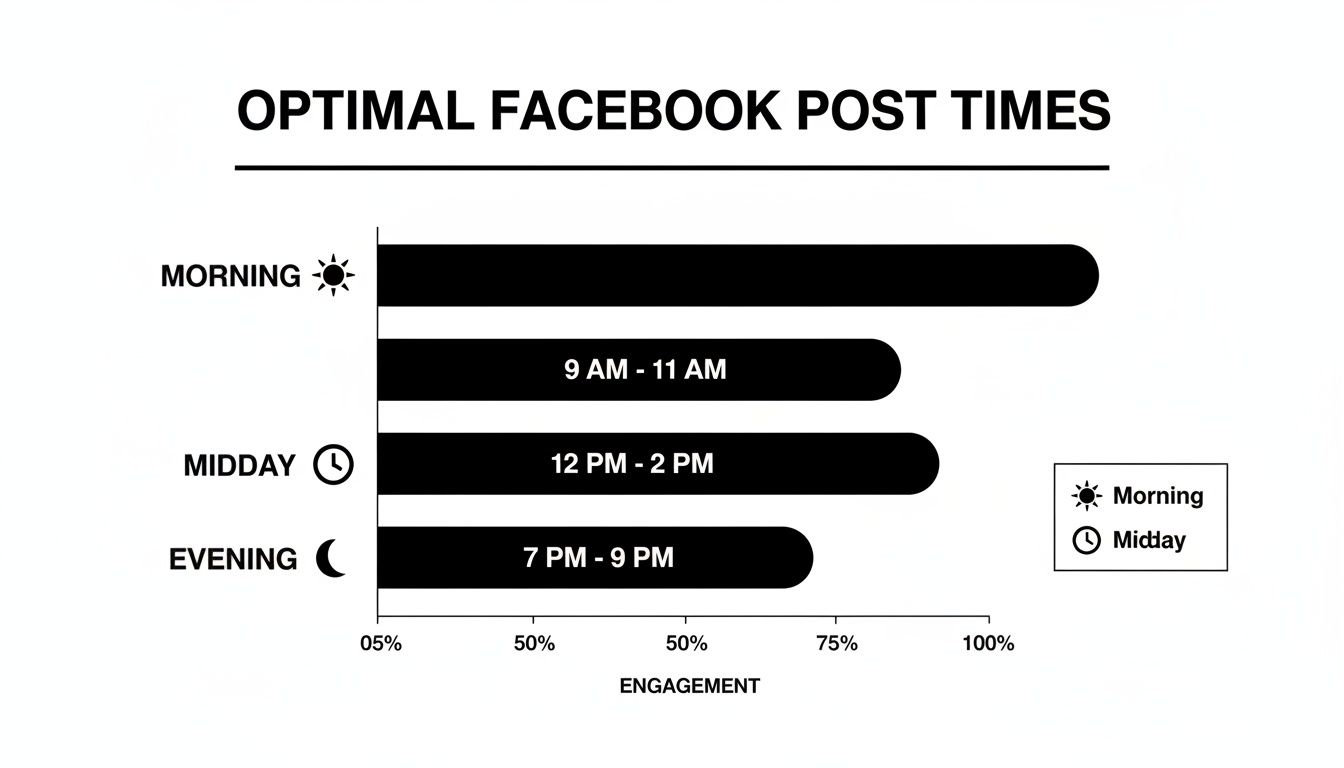
This visual makes it obvious that while the morning and midday periods are strong contenders, you shouldn't discount the power of an evening post.
Key Takeaway: Using these generalized peak times is your first step. The real goal is to layer your own audience data on top to find the exact hours that make your content shine.
To get you started, here’s a breakdown of those common high-engagement windows. Just remember to treat these times as being in your audience's primary time zone.
General Best Times to Post on Facebook (Based on Widespread Data)
| Day of the Week | Primary Peak Window | Secondary Peak Window |
|---|---|---|
| Monday | 9:00 AM – 12:00 PM | 5:00 PM – 7:00 PM |
| Tuesday | 8:00 AM – 10:00 AM | 6:00 PM – 8:00 PM |
| Wednesday | 7:00 AM – 9:00 AM | 2:00 PM – 5:00 PM |
| Thursday | 9:00 AM – 11:00 AM | 7:00 PM – 8:00 PM |
| Friday | 7:00 AM – 9:00 AM | 1:00 PM – 5:00 PM |
This table gives you a solid, data-backed foundation. Now, let’s talk about how to move beyond these generalities and find what works specifically for you.
Why There’s No Magic "Best Time" to Post
While you'll find plenty of charts and studies offering broad advice, the idea of a single, perfect time to post on Facebook is, frankly, a myth. Relying on those averages is a bit like assuming the 8 AM rush at Starbucks is the best time to catch up with your friends. Sure, the place is busy, but your group might actually prefer the quiet afternoon lull.
The same principle holds true for your Facebook audience. Your ideal posting window isn't some universal constant; it's a unique sweet spot determined by your brand and your followers. Every audience is different, and so are their daily habits.
Your Audience Runs the Show
The biggest factor, by far, is who you're talking to. Think about it: the daily routine of a college student looks nothing like that of a 9-to-5 professional or a stay-at-home parent. If you're trying to reach night-shift nurses, their "peak" online time might be when everyone else is fast asleep.
Key Insight: The best time to post is simply a mirror of your audience's daily life. Get to know their routine, and you’ll know when to show up in their feed.
For instance, a business selling professional development courses will probably see a lot more action during lunch breaks and right after the workday ends. On the other hand, a brand sharing parenting tips might get its best engagement early in the morning before the school run or late at night after the kids are finally in bed.
Time Zones and the All-Mighty Algorithm
Geography matters. If your audience is spread out across the country—or the world—posting at 9 AM in your local time zone can be a waste. A brand in New York posting at 9 AM EST is hitting the West Coast at 6 AM PST, a time when most people are still hitting snooze, not scrolling Facebook.
Then there's the Facebook algorithm. It loves fresh, engaging content. When you post at a time your followers are actually online and active, you get an immediate burst of likes, comments, and shares. This initial traction signals to the algorithm that your post is worth showing to more people, amplifying its reach.
Ultimately, your perfect posting time is a blend of these key ingredients:
- Audience Demographics: Age, job, and lifestyle all shape when people scroll.
- Geographic Location: A national or global audience means you have to think beyond your own time zone.
- Industry Niche: B2B brands often do well during business hours, while B2C hobby brands might kill it on evenings and weekends.
Consider the general data a good map, but your own analytics are the "you are here" pin. The real magic happens when you stop looking at generic advice and start digging into your own data to find what truly works for your brand.
Matching Your Content Type to Your Schedule
Figuring out the best time to post on Facebook isn't just a numbers game. You have to think about what you're posting, because the type of content you share has a massive impact on when your audience will actually pay attention to it. It’s a simple but powerful idea: people engage with different kinds of content at different times of the day.
Think about your own daily routine. You might scroll through a few funny memes or eye-catching photos while waiting for your morning coffee. That kind of content is quick, visual, and doesn't require much brainpower. It’s perfect for those little two-minute gaps we all have.
But you probably wouldn't watch a 10-minute deep-dive video or read a long, detailed article while you're rushing to get your workday started, right? You save that stuff for later—maybe over lunch or in the evening when you can kick back and actually focus.
Aligning Post Type with User Mindset
This is the secret to a much smarter scheduling strategy. You need to match the mental energy your content demands with the user’s mindset at any given time. High-commitment content, like in-depth videos or meaty guides, works best when your audience has the time and mental space to dig in.
On the flip side, low-commitment content—think quick tips, images, or short Reels—is perfect for those high-energy, busy moments when people are just looking for a quick distraction. Getting a handle on the different types of content for social media is your first step toward building a schedule that truly works.
Key Takeaway: The goal isn't just to post when people are online. It's to post the right kind of content when they're in the right frame of mind to actually enjoy it.
The data backs this up, showing that different formats have wildly different engagement potentials. For example, a standard Facebook video post gets an average engagement rate of 0.08%. That’s a bit lower than a photo post at 0.12% and quite a bit better than a link post, which sits at a tiny 0.03%.
But then you have Facebook Reels, which are playing a completely different game. Medium-sized accounts are seeing an incredible average engagement rate of 1.76% with Reels. That’s a huge difference.
Content Type and Engagement Potential
This is exactly why a one-size-fits-all schedule just doesn't cut it. A quick, snappy Reel might be perfect for a busy morning commute, but a longer, more thoughtful video is probably better saved for an evening slot.
Let's break down how different content formats stack up and when they're most likely to hit the mark.
Facebook Post Type vs. Average Engagement Rate
The table below gives you a clear look at how different Facebook content types perform. You can see right away why Reels are getting so much attention—their engagement rate blows everything else out of the water.
| Post Type | Average Engagement Rate | Best Potential Viewing Time |
|---|---|---|
| Reels | 1.76% (for medium accounts) | Peak Scroll Times: Morning commute (7-9 AM), lunch break (12-2 PM), and evening (7-9 PM) when users want quick entertainment. |
| Image/Photo Posts | 0.12% | Throughout the Day: Highly versatile. Effective for quick updates during the workday or visually engaging content in the evenings. |
| Video Posts (Longer) | 0.08% | Downtime Hours: Evenings (after 8 PM) and weekends when users have more time to watch and absorb longer content. |
| Link Posts | 0.03% | Midday/Afternoon: Best during work breaks (1-3 PM) when users might click through to read an article or blog post. |
By aligning your schedule with these natural user habits, you’re no longer just guessing. You're starting a real conversation with your audience by giving them the right kind of value, exactly when they’re ready for it.
How to Find Your Audience's Peak Active Hours
General data gives you a map, but your own analytics are the real treasure. This is where you graduate from following generic advice to building a Facebook strategy that actually works for your audience. Instead of just guessing or copying someone else's schedule, you're about to become a bit of a data detective, letting your followers' habits point you in the right direction.
The goal is simple: find out exactly when your community is most likely to be scrolling, liking, and commenting. When you nail this, your content gets seen by the right people at the perfect moment, which is a game-changer for your reach and engagement. This is how you discover the true best time of day for Facebook posts for your brand.
Start with Your Facebook Insights
Your first set of clues is already waiting for you inside the Meta Business Suite. It’s packed with data, but for now, we're zeroing in on one key piece of intel: when your followers are online. This is the fastest way to stop guessing and start seeing a clear picture of their daily and weekly routines.
Just head to the Insights tab and find the Audience section. You’ll see a chart showing the days and hours your followers were most active over the last week.

Look for the darker bars—those represent peak activity times. Think of these as your prime testing grounds, the most promising windows to start experimenting with.
Design a Simple A/B Testing Schedule
Once you've spotted those peak hours, it's time to run a few simple experiments. An A/B test for timing just means posting similar content at different times to see what performs better. Don't overthink it; a straightforward plan is all you need.
- Pick Your Times: Choose two or three of the peak slots you found in Insights. If your data points to high activity around 9 AM, 1 PM, and 8 PM, those are your test times.
- Keep Content Consistent: To get a clean result, you need to compare apples to apples. Create posts that are similar in format and topic. You can't fairly compare a viral-worthy video against a simple text update; that’ll just skew your data.
- Run the Test: For the next week or two, post your content at these different times. Stay consistent and make a note of how each post performs.
To really get the most out of your tests, it helps to understand the bigger picture of effective social media marketing strategies. Having that broader context makes it easier to figure out why certain times are working better than others.
Track the Metrics That Matter
As you run your tests, what you measure is everything. It’s not just about racking up likes. You want to see meaningful interactions that signal to the algorithm that your content is worth showing to more people.
Keep a close eye on these metrics:
- Reach: How many unique people actually saw your post?
- Comments: This is gold. Comments show genuine interest and help build a real community.
- Shares: When someone shares your post, they’re vouching for it to their own network. It’s one of the strongest engagement signals you can get.
The impact of a dialed-in strategy is huge. One analysis showed a small page with 23,487 fans hitting a massive 46.33% engagement rate, while a much larger page barely cracked 1.79%. It’s proof that a smart, timed strategy beats a massive follower count any day.
After a week or two of this, you’ll start to see patterns emerge. Certain time slots will consistently bring in better reach and more comments or shares. To keep everything organized, our https://www.evergreenfeed.com/blog/social-media-analytics-report-template/ can help you sort through the numbers. This is how you build a powerful, data-driven posting schedule that’s tailored specifically for your audience.
Automating Your Perfect Facebook Schedule
Figuring out when your audience is most active is a huge win, but let's be real—that’s only half the battle. The secret to lasting success is consistency. And trying to manually post at the exact right minute every single day? That’s a surefire recipe for burnout.
This is where automation completely changes the game. It turns your strategy from a relentless daily chore into a smart, efficient system that works for you.
By using a scheduling tool, you can set your data-backed schedule and let it run on autopilot. This frees you from constantly watching the clock, so you can focus on what you actually enjoy: creating fantastic content that your audience genuinely wants to see. Think of it as hiring a super-punctual assistant who never takes a day off.
Building Your Content Buckets
A truly effective automation strategy begins with good organization. Instead of just throwing random posts into a queue, you can group your content into "buckets" based on themes or post types. This simple step keeps your feed fresh, interesting, and valuable.
Here’s a practical example of how you could structure your buckets:
- Quick Tips: Short, punchy advice perfect for that morning coffee scroll.
- Reels & Videos: Fun, engaging content for those peak evening wind-down hours.
- Blog Post Links: Deeper-dive articles scheduled for midday, when people take a lunch break.
- Promotional Posts: Special deals or big announcements saved for high-traffic windows, like a Friday afternoon.
Once your buckets are full, you can assign each a specific schedule based on the posting data you’ve gathered. Your "Quick Tips" might go out every weekday at 9 AM, while your "Reels" are set for Tuesdays and Thursdays at 8 PM.
Tools like EvergreenFeed are built for exactly this kind of workflow, letting you create these categorized libraries of content. This whole approach ensures you’re not just posting consistently, but sharing the right kind of content at the best time of day for Facebook posts.
Key Insight: Automation isn't about laziness; it's about being strategic. It ensures your very best content reaches your audience when they're most likely to see and interact with it—all without you being chained to your desk.
This "set it and forget it" process is incredibly effective. You do the important work upfront—creating great content and finding your peak times—and then let the system handle the day-to-day execution. If this is a new concept for you, learning how to automate social media posts can give you a great starting point for building out an efficient system.
If you want to go even deeper on the workflow side of things, there are some excellent guides on creating effective automated social media posts that can help you dial in your process. When you combine smart scheduling with organized content buckets, you create a powerful, high-performing presence that gets results on autopilot.
Common Facebook Scheduling Mistakes to Avoid
You’ve done the hard work of digging into your analytics to find when your audience is most active. That's a huge win! But even with the perfect time slots picked out, a few common slip-ups can completely sabotage your results.
Let's walk through the three biggest mistakes I see people make, so you can steer clear of them and make sure your carefully planned content actually gets seen.
Ignoring Your Audience's Time Zone
This one trips up so many people. It’s easy to forget that your 9 AM isn't everyone's 9 AM. If you’re based in New York and schedule a post for your morning coffee break, that means your followers in California are still asleep at 6 AM. Right away, you’ve missed a massive chunk of your audience.
The Fix: Your posting schedule should revolve around your audience's primary time zone, not your own. Pop into your Facebook Insights and find out where the majority of your followers are located. If you have a widespread audience, anchor your most important posts to the time zone where you have the biggest concentration of fans.
Being Inconsistent with Your Posting Frequency
Blasting out five posts one week and then going completely silent the next is a surefire way to confuse both your followers and the Facebook algorithm. Consistency creates a rhythm. Your audience starts to expect content from you, and the algorithm learns that your page is an active, reliable source. A chaotic schedule kills any momentum you build.
Key Takeaway: The algorithm absolutely favors reliability. Sticking to a consistent schedule, even if it's just one great post a day, will always deliver better results than a frantic, unpredictable burst of activity.
Neglecting Post-Publication Engagement
This might be the most critical mistake of all: the classic "post and ghost." Hitting "publish" is just the beginning. The first hour after your post goes live is a golden opportunity to show the algorithm that your content is valuable and sparking conversation.
The Fix: Make it a habit to stick around for at least 30-60 minutes after posting to interact with comments as they come in. Answering questions and replying to feedback doesn't just build a loyal community—it actively signals to Facebook that your post is worth showing to more people.
Got Questions About Facebook Post Timing? We've Got Answers

Even with the best data, a few specific questions always pop up. Let's tackle some of the most common ones you'll run into while trying to nail down the best time of day for Facebook posts.
Do I Need to Change My Posting Times on Weekends?
Yes, absolutely. Think about your own weekend routine—it’s probably a lot different from your Monday-to-Friday grind. The same goes for your audience.
Weekday engagement often spikes around lunch breaks or the evening wind-down. On weekends, however, that activity is much more relaxed and spread out. People are often online later in the morning or throughout the afternoon. Don't just copy and paste your weekday schedule; treat Saturday and Sunday as their own unique beasts and check your data to see when your specific audience is scrolling.
How Often Should I Re-Check My Posting Schedule?
Things change. Your audience evolves, Facebook tweaks its algorithm, and what worked last quarter might not work today.
A good rule of thumb is to take a deep dive into your posting times every 3-6 months. This keeps your strategy fresh and aligned with current habits. Of course, if you see a sudden, noticeable drop in your engagement, that’s your cue to investigate immediately, regardless of when you last checked.
Key Insight: Always orient your schedule around your audience's primary time zone. If your followers are scattered globally, dive into your Facebook Insights. Find where the biggest chunk of your audience lives and anchor your most important posts to their peak hours.
Ready to stop watching the clock? With EvergreenFeed, you can set up your ideal schedule once and let the automation do the rest. Build your content libraries, tell it when to post based on your data, and you'll never miss a peak engagement window again. Start automating your evergreen content for free.